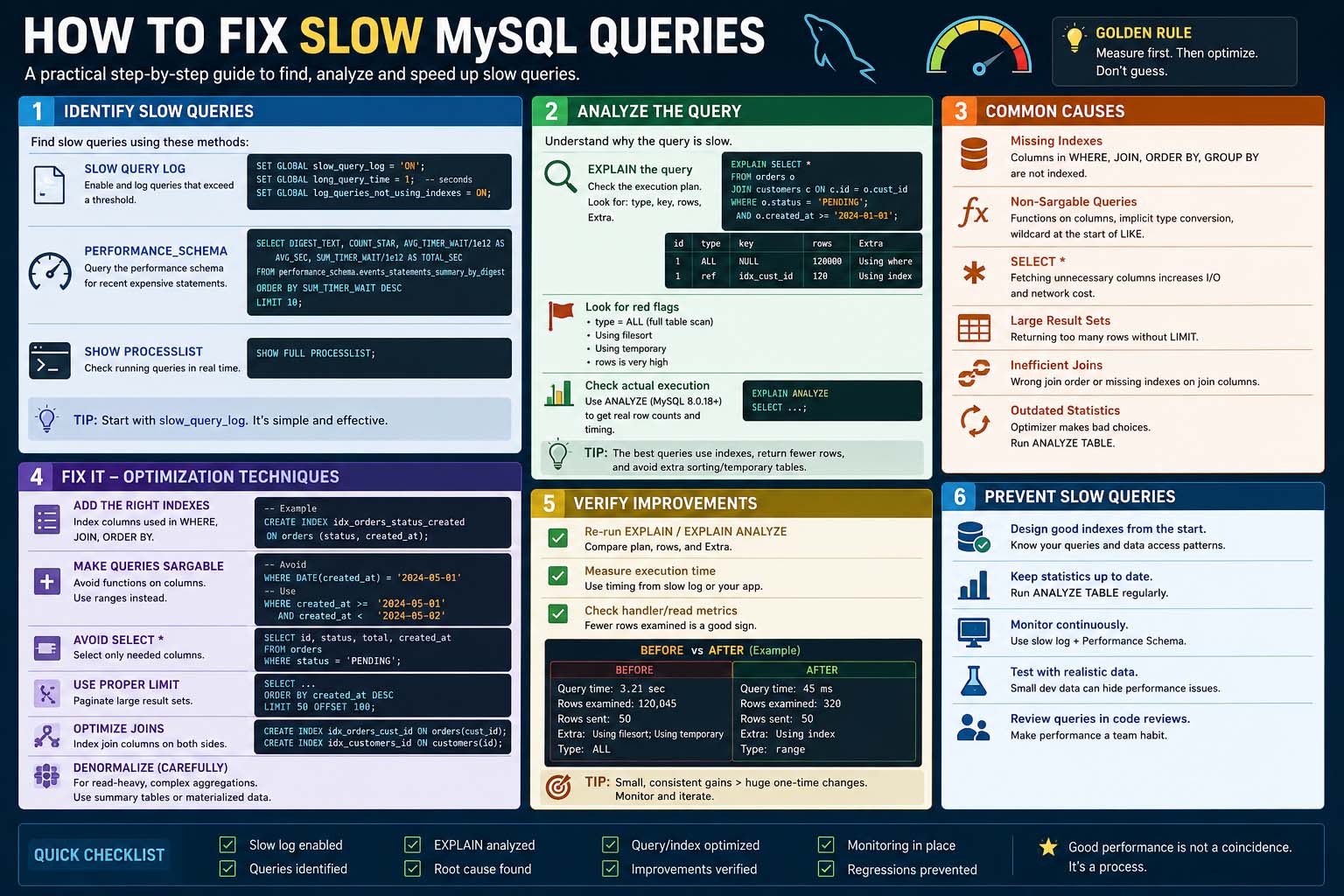
Slow database performance can make a website feel frustrating and unreliable. Whether you run a blog, an eCommerce store, or a business platform, database speed directly affects user experience and search engine rankings. Many website owners notice pages taking several seconds to load without understanding that the database is often the real problem. Learning how to fix slow MySQL queries can dramatically improve server response times and overall website performance.
MySQL powers millions of websites and applications around the world. When queries are poorly optimized, the server consumes excessive CPU and memory resources, causing delays and sometimes even crashes. Fortunately, there are practical ways to identify and resolve these problems before they seriously impact your site.
Understanding Why MySQL Queries Become Slow
Slow MySQL queries usually happen because the database is forced to scan too much data. Instead of quickly finding information through indexes, the system checks entire tables row by row. This process becomes even worse on large websites with thousands or millions of records.
Another common issue is poorly written SQL statements. Queries that request unnecessary columns, use multiple joins incorrectly, or include inefficient sorting operations can increase execution time. Shared hosting environments may also contribute to slower performance because limited server resources affect database operations.
The first step in optimization is understanding how MySQL processes requests internally. When a query is executed, MySQL creates an execution plan to determine the fastest way to retrieve data. If the database lacks proper indexing or contains fragmented tables, the execution plan becomes inefficient and slows down the entire system.
Using MySQL Slow Log for Performance Analysis
One of the best ways to diagnose database performance issues is enabling the mysql slow log feature. This built-in MySQL tool records queries that take longer than a specified amount of time to execute. Instead of guessing which operations are causing delays, administrators can analyze real data directly from the server.
The slow log helps identify patterns in database activity. For example, if a particular SELECT statement appears repeatedly in the log, it may indicate a missing index or a poorly optimized plugin. Many WordPress websites suffer from slow plugins that generate excessive database requests without proper optimization.
Enabling the slow query log is relatively simple. In most server configurations, administrators can activate it through the MySQL configuration file. Once enabled, the database begins recording problematic queries for later analysis.
Optimizing Tables and Indexes
Indexes are one of the most important factors in database performance. This process becomes extremely slow on large datasets.
Adding indexes to frequently searched columns can significantly reduce query execution time. Columns commonly used in WHERE clauses, JOIN statements, and ORDER BY operations are ideal candidates for indexing. However, too many indexes can also reduce performance because MySQL must update them whenever records are inserted or modified.
Database administrators should also optimize tables periodically. Over time, deleted or modified rows create fragmentation inside database files. Running optimization commands reorganizes the data structure and improves efficiency.
Many developers ignore table maintenance until performance problems become obvious. Regular optimization helps maintain consistent speed and prevents database bloat from affecting applications.
How MySQL Log Slow Queries Helps Detect Problems
The feature known as mysql log slow queries provides valuable insights into server performance bottlenecks. It records SQL statements that exceed the configured execution threshold. Instead of manually reviewing every query generated by an application, administrators can focus only on the slowest operations.
This logging system is especially useful for high-traffic websites where even small delays can affect thousands of users. For example, an online store experiencing heavy traffic during promotions may encounter overloaded database operations. Slow query logs reveal which database requests consume the most resources during peak activity.
Once problematic queries are identified, developers can rewrite them more efficiently. Sometimes the solution involves simplifying joins or reducing unnecessary data retrieval. In other cases, caching frequently requested information can dramatically improve speed.
Analyzing slow queries consistently helps maintain stable database performance and prevents server overload.
Improving Query Structure
Writing efficient SQL queries is essential for long-term performance. Many beginners use SELECT * statements without realizing that retrieving unnecessary columns increases resource usage. Instead, queries should request only the data actually needed.
Complex joins should also be minimized whenever possible. Queries involving multiple large tables can quickly become resource intensive. Breaking large operations into smaller queries may improve overall speed.
Monitoring MySQL Slow Query Log
The mysql slow query log is one of the most valuable tools for database optimization. It provides direct visibility into which SQL statements are causing delays. Without monitoring tools like this, diagnosing performance issues becomes much more difficult.
Administrators often combine slow query logs with monitoring software to gain deeper insights into server behavior. Tools like MySQL Workbench, phpMyAdmin, and command-line utilities help analyze query execution times and identify inefficiencies.
Fixing MySQL Long Running Queries
One of the most serious database issues involves mysql long running queries that consume server resources for extended periods. These queries can lock tables, slow down other operations, and even cause websites to become unresponsive.
Long running queries are often caused by missing indexes, excessive joins, or poorly designed application logic. Identifying them quickly is essential for maintaining server stability.
Developers should review execution plans using the EXPLAIN command. This feature shows how MySQL processes a query internally and highlights inefficiencies. If the execution plan indicates full table scans or temporary sorting operations, optimization is usually necessary.
Conclusion
Learning how to fix slow MySQL queries is essential for maintaining fast and reliable websites. Slow database operations affect user experience, SEO rankings, and server stability. Fortunately, most performance issues can be resolved through proper optimization techniques.