
Computers rely on memory to run programs and handle tasks smoothly. So if you want to know what is a swap file, it helps to start with memory management. For example, many users hear the term while working with Linux, virtual memory settings or servers. However, they may not fully understand its purpose. Learning how swap works can help you improve system speed and manage computer resources better.
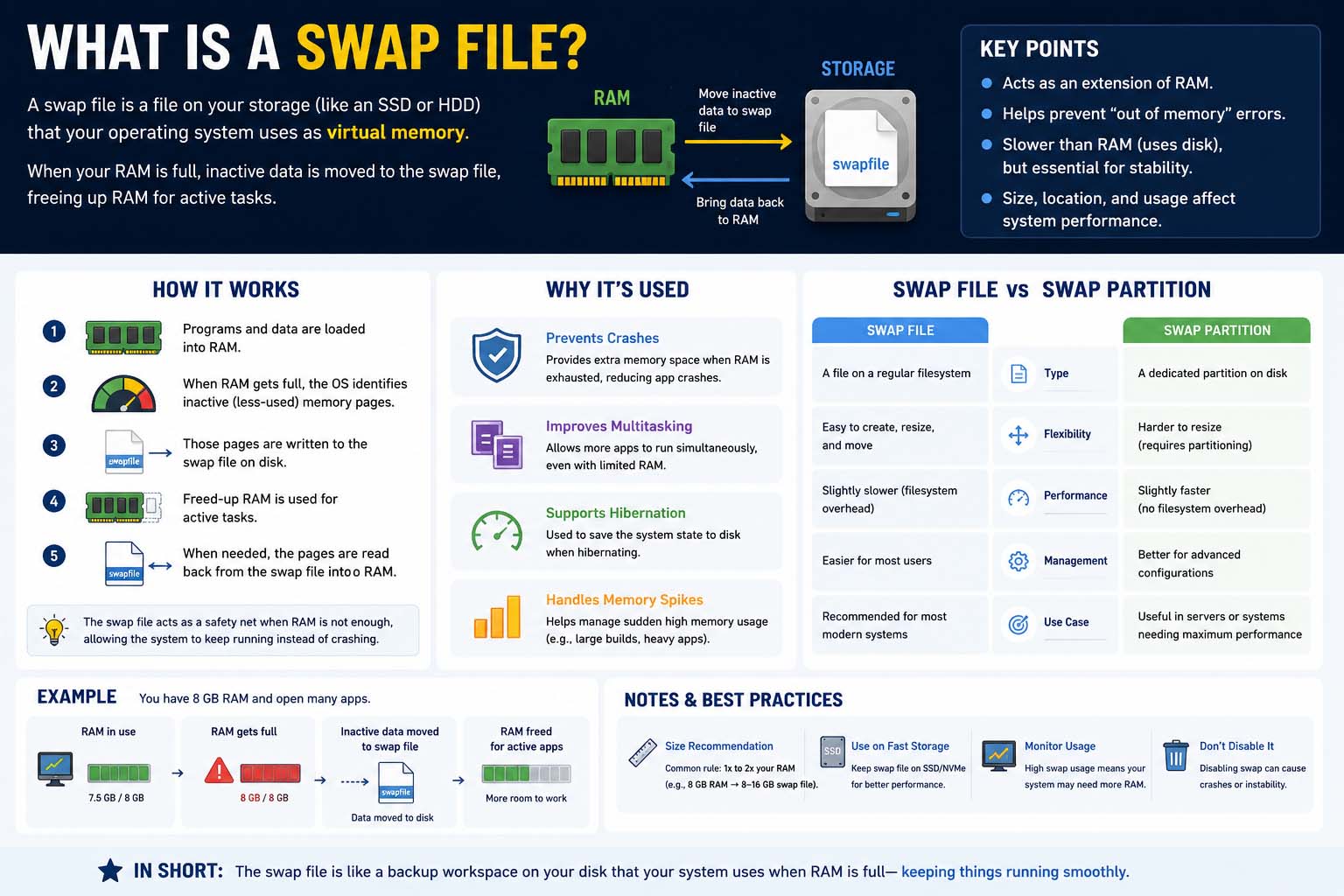
A swap file acts as extra virtual memory when the computer’s physical RAM fills up. Instead of closing apps right away, the operating system moves inactive data from RAM to the hard drive or SSD for a while. As a result, the system keeps running even under heavy workloads.
Modern operating systems such as Linux use swap files or swap partitions to stay flexible and stable. Although swap memory runs slower than physical RAM, it still plays a key role in preventing crashes and improving multitasking.
What Is a Swap File or Swap Space?
One of the most common questions users ask is what is a swap file or swap space? Swap space is an area on a storage device that the operating system uses as virtual memory. This space can exist as its own partition or as a regular file called a swap file.
When the system runs low on RAM, it moves inactive memory pages into swap space. This step frees physical memory for active programs. For instance, if you open many apps at once, the operating system may shift rarely used data into swap to keep the computer responsive.
Swap space helps prevent memory shortages that could make apps freeze or crash. Servers and workstations also rely on it for reliability, especially during large workloads. Good memory management also supports database speed, so learning how to fix slow MySQL queries matters for responsive servers.
Swap space adds extra memory capacity, but it is not as fast as physical RAM because storage devices read and write data more slowly. However, modern SSDs make swap much faster than traditional hard drives.
How Swap Files Work
A swap file holds inactive memory data on disk storage. Later, when an app needs that data again, the operating system brings it back into RAM.
Operating systems watch memory use all the time. They decide which data should stay in RAM and which data can move into swap storage for now. Generally, the system keeps active apps in RAM while it sends background processes to swap.
Computers with limited RAM benefit greatly from swap files because they let more apps run at the same time. Meanwhile, systems with plenty of RAM use swap less often, but swap still offers protection during sudden memory spikes.
What Is a Swap File or Swap Space
The phrase what is a swap file or swap space often appears in technical courses, certification exams and operating system tutorials. Similarly, students who study operating systems often explore the reverse engineering meaning to see how software uses memory and other system resources. Therefore, system administrators and Linux users need to understand this idea, since swap settings directly affect performance.
Swap space serves as overflow memory for the operating system. In other words, it gives the computer a safety net when RAM cannot handle heavy workloads alone.
On desktops, swap helps when many browser tabs, apps or editing programs use large amounts of memory. Likewise, on servers, swap can help keep websites online during traffic spikes or demanding processes.
Benefits of Using Swap Files
Swap files offer several advantages for both personal computers and servers. First of all, they improve system stability. Even if RAM use climbs very high, the system can keep working by using virtual memory.
Another advantage is flexibility. You can usually resize a swap file more easily than a dedicated swap partition. As a result, swap files suit modern Linux systems where storage needs may change over time.
Swap files also support hibernation in some operating systems. During hibernation, the system saves the contents of RAM to swap space. Then, the computer can restore your previous session when you power it back on.
Question 6 What Is a Swap File or Swap Space?
The phrase question 6 what is a swap file or swap space? often appears in school assignments, IT certification exams and computer science quizzes. The correct answer is that swap space acts as virtual memory when physical RAM runs short.
In technical classes, teachers often ask this question to test how well students understand memory management. So students should explain how operating systems use swap storage to hold inactive data for a short time.
What Is a Swap File in Linux
The topic what is a swap file in Linux matters because Linux systems often use swap files and swap partitions to manage memory. In addition, Linux offers flexible tools to create, resize and manage swap storage.
A swap file in Linux is simply a special file that the operating system uses as virtual memory. Unlike a swap partition, which takes up its own section of the disk, a swap file sits inside the normal file system. Thus, administrators can change the swap size without repartitioning their drives.
Linux offers commands such as swapon, swapoff and free to manage and monitor swap use. Administrators can also check active swap areas with other terminal commands.
The Linux kernel uses a setting called swappiness to decide how often it should use swap space. According to the official Linux kernel documentation, swappiness can range from 0 to 200, and the default value is 60. Lower values favor physical RAM, whereas higher values push the system to use swap more often.
Conclusion
Understanding what is a swap file helps anyone interested in computers, Linux or system performance. Memory management also matters in mechatronics, where computers control sensors, hardware and automated systems. In short, a swap file acts as virtual memory that keeps systems running when physical RAM fills up. Although swap space runs slower than RAM, it adds stability, supports multitasking and prevents crashes during heavy workloads.