A strong remote work setup can transform the way you work each day. Whether you are a freelancer, business owner, student, or full-time employee, having the right environment helps improve focus, comfort, and productivity. As remote work continues to grow around the world, more people are investing in better tools and smarter spaces to create efficient home offices.
Working from home offers flexibility, but it also brings challenges such as distractions, poor posture, and lack of routine. That is why creating the ideal remote work setup is important. From choosing the right desk to improving internet speed, every detail matters when building a workspace that supports long hours and professional performance.
Remote Work Desk Setup for Daily Productivity
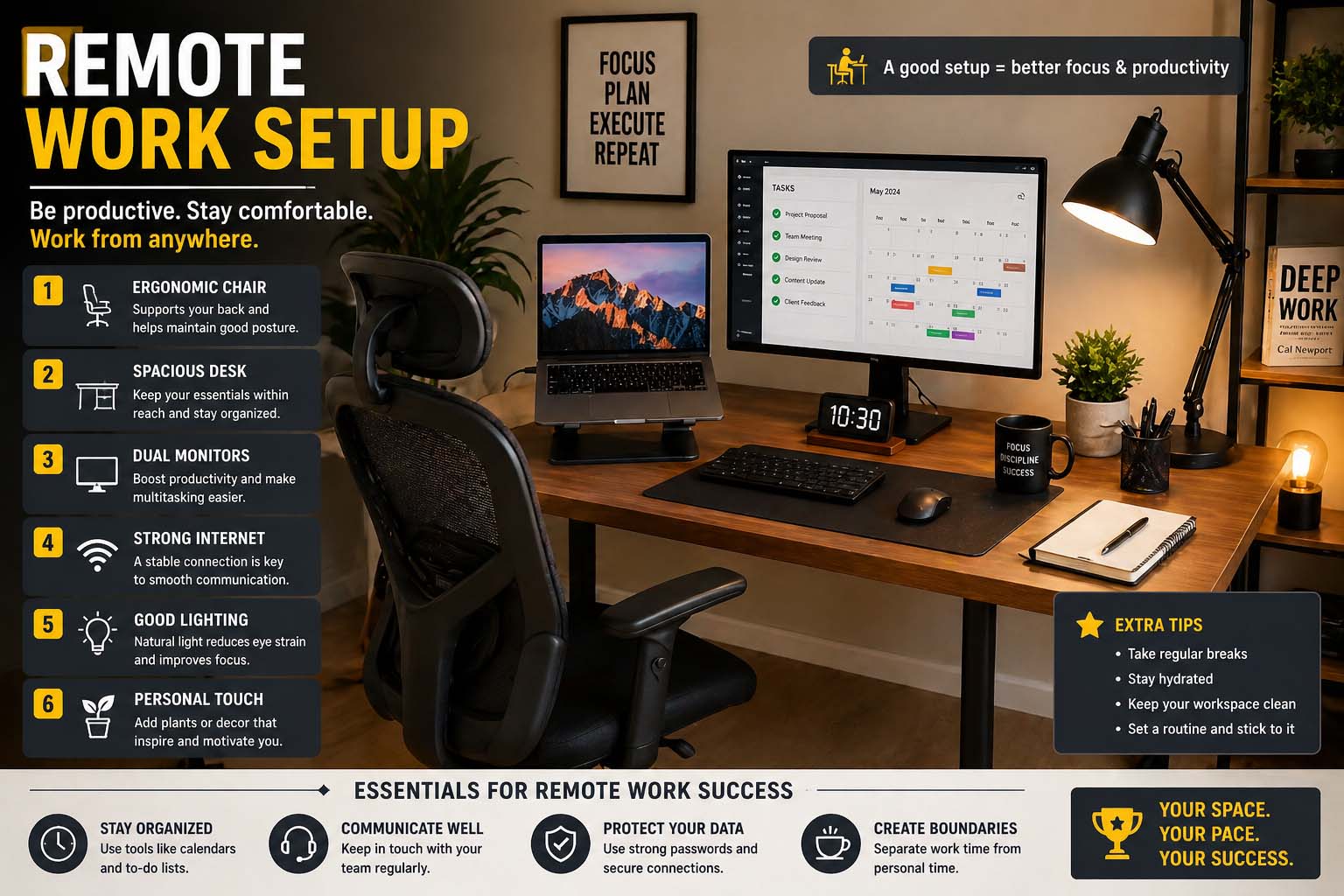
Your remote work desk setup is the foundation of your workday. A desk should be spacious enough to hold your laptop, monitor, keyboard, notebook, and accessories without feeling crowded. Many professionals prefer adjustable desks because they allow sitting and standing throughout the day, helping reduce back pain and fatigue.
Choose a comfortable ergonomic chair that supports your spine and encourages proper posture. Pairing the right chair with the right desk height can prevent neck strain and wrist discomfort. Lighting is another essential factor. Natural light is ideal, but if your room lacks windows, a quality desk lamp can reduce eye strain and brighten your workspace.
Keep your desk organized with cable management tools, storage trays, and minimal clutter. A clean desk can improve mental clarity and make it easier to stay focused. Plants, framed photos, or simple décor can also make your remote work setup feel more welcoming and inspiring.
Remote Work Office Setup for a Professional Environment
A dedicated remote work office setup can help separate your professional life from your personal life. If possible, choose a quiet room with a door that can be closed during meetings or focused tasks. This creates boundaries and reduces interruptions from family members or household noise.
Paint colors and room design can affect mood and concentration. Neutral shades such as white, gray, or light blue often create a calm environment. Add shelves or cabinets to store files, office supplies, and equipment neatly.
Sound quality matters during calls and meetings. Use rugs, curtains, or acoustic panels to reduce echo and background noise. If you regularly attend video meetings, position your camera at eye level and make sure your background looks tidy and professional.
Reliable internet is one of the most important parts of any remote work setup. Consider upgrading your router or moving closer to it for stronger Wi-Fi signals. If your job depends on constant connection, an Ethernet cable may offer more stable speeds than wireless internet.
How to Setup Remote Desktop to Work From Home
Many companies require secure access to office computers. Learning how to setup remote desktop to work from home can make your workflow smoother and more efficient. Remote desktop tools allow you to connect to your office PC from your home computer, giving access to files, programs, and internal systems.
First, ensure the office computer is powered on and connected to the internet. Enable remote desktop settings on that machine according to your company’s IT policies. Then install the approved remote desktop software on your home device. Popular business solutions often include secure login systems and multi-factor authentication.
Next, use your credentials provided by the company to connect. Always use strong passwords and secure networks when accessing work systems remotely. Avoid public Wi-Fi unless you are using a trusted VPN connection. Once connected, you can use your office desktop almost as if you were sitting in front of it.
Understanding how to setup remote desktop to work from home is especially useful for employees who need specialized software or confidential files stored only on office devices.
Best Smart Display for Remote Work Setup
Technology can improve communication and productivity. Choosing the best smart display for remote work setup depends on your needs, workspace size, and budget. Smart displays can show calendars, reminders, video calls, weather updates, and task lists all in one place.
For smaller desks, compact smart displays work well because they save space while still offering useful features. Larger models are ideal for professionals who join frequent meetings or need larger visuals for scheduling and collaboration.
Voice assistant integration can also save time. You can set reminders, start music for focus sessions, check the day’s agenda, or control smart lights without leaving your chair. This makes the remote work setup more convenient and modern.
When choosing a smart display, look for clear speakers, sharp camera quality, privacy controls, and compatibility with the tools you already use. A good smart display can become the command center of your home office.
Essential Tools for a Better Remote Work Setup
Beyond desks and displays, several tools can enhance your workspace. A second monitor improves multitasking by allowing multiple windows to stay open at once. Noise-canceling headphones help block distractions and improve call quality. A mechanical or ergonomic keyboard can make typing more comfortable during long hours.
Webcams with high resolution are useful if your laptop camera is poor quality. External microphones create clearer audio for meetings, podcasts, or presentations. Surge protectors and backup power devices can also protect your equipment.
Software matters too. Task management apps, cloud storage platforms, password managers, and video conferencing tools all contribute to a smoother remote work setup.
Staying Healthy While Working Remotely
Comfort and productivity go together. Stretch regularly, take short breaks, and walk around every hour. Keep water nearby and maintain a healthy schedule.
Use blue-light filters or screen settings in the evening to reduce eye strain. Position monitors at eye level and keep wrists straight while typing.
Conclusion
Creating the ideal remote work setup is about combining comfort, technology, and organization. A smart desk arrangement, dedicated office space, secure remote access, and helpful tools all make working from home easier and more productive.