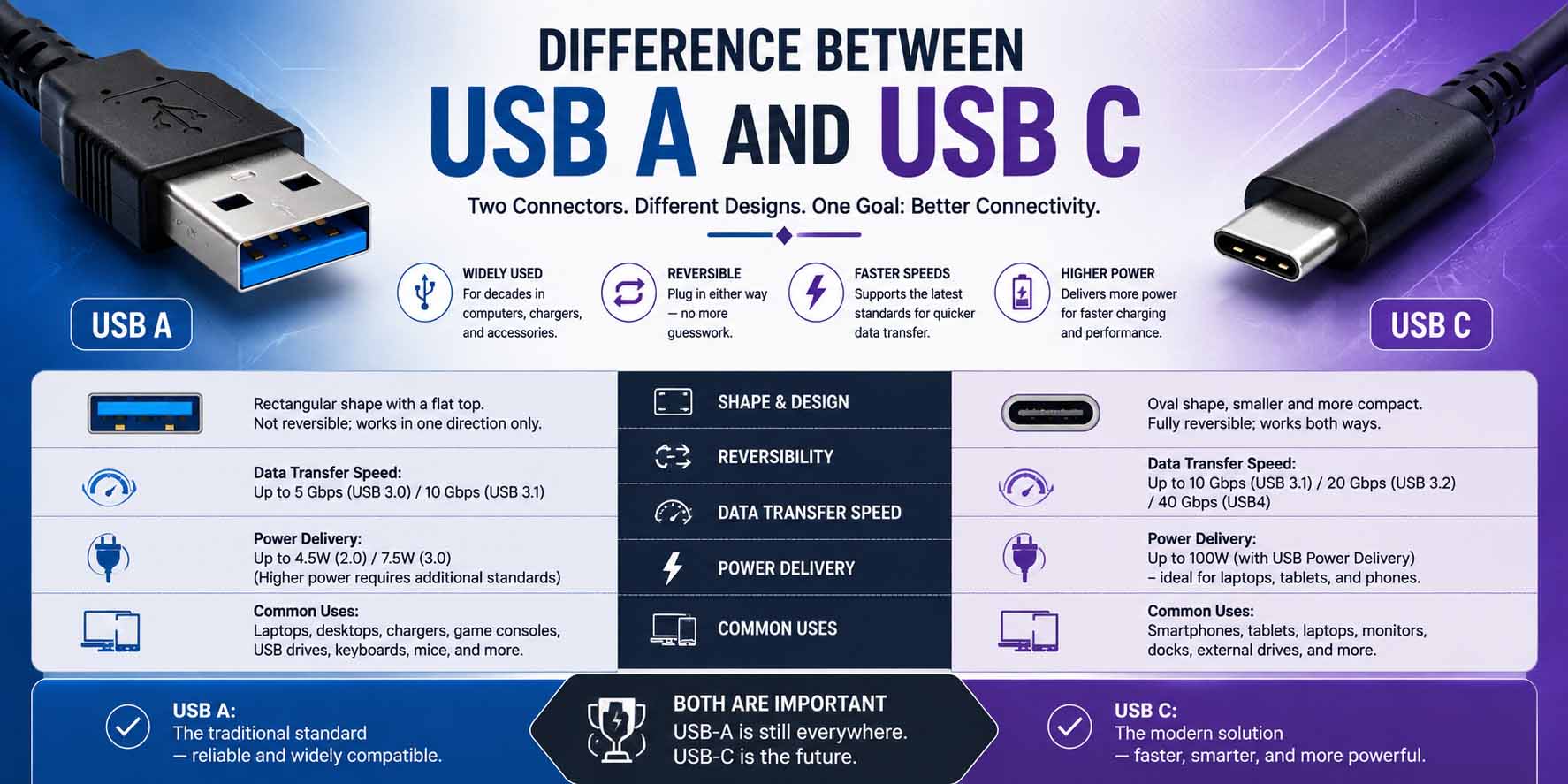
If you’ve recently bought a new laptop, smartphone, or accessory, you’ve probably noticed that USB-C is becoming the standard. Naturally, that raises the question: what is the difference between USB A and USB C? While both connectors transfer data and deliver power, they differ in design, speed, charging ability, and long-term compatibility.
Above all, knowing how they compare helps you choose the right cable, charger, and accessories without running into compatibility issues. So whether you’re connecting a flash drive, charging a laptop, or moving large files, this guide can save you time and frustration.
What Are USB A and USB C?
USB stands for Universal Serial Bus, a standard created to simplify connections between computers and electronic devices.
USB-A is the original, rectangular connector. Even today, you’ll find it on desktop computers, TVs, gaming consoles, printers, and many older accessories.
In contrast, the newer oval connector arrived in 2014. It has a smaller, symmetrical design and supports faster data transfer, higher charging power, and modern display technologies.
Although both connectors belong to the USB family, they look different and often support different features.
Difference Between USB A and USB C at a Glance
| Feature | USB-A | USB-C |
|---|---|---|
| Connector Shape | Rectangular | Small, oval, reversible |
| Plug Orientation | One-way only | Reversible |
| Maximum Charging Power | Limited (depends on version) | Up to 240W with USB Power Delivery |
| Data Speed | Up to 10 Gbps (USB 3.2 Gen 2) | Up to 80 Gbps (USB4 Version 2.0) |
| Video Output | Usually no | Supports DisplayPort, HDMI, and Thunderbolt (device dependent) |
| Common Devices | PCs, TVs, printers, flash drives | Phones, laptops, tablets, monitors, SSDs |
However, the connector alone doesn’t decide speed. The USB version that both the cable and the device support also matters.
What Is the Difference Between USB A and USB C?
Although they handle many of the same tasks, several key differences separate these connectors.
Physical Design
The most obvious difference is the plug itself. USB-A uses a large rectangular plug that fits only one way, so it is common on older devices.
On the other hand, USB-C uses a compact oval plug that is fully reversible. As a result, it is easier to plug in and better suited to thin laptops and smartphones.
In fact, this reversible design is one of the biggest reasons the newer connector has become so popular.
Charging Capability
The newer connector greatly improves charging. For example, older USB-A ports typically provide between 2.5W and 15W, depending on the device and USB version.
By comparison, a USB-C port with Power Delivery (PD) can fast-charge phones and power tablets, laptops, and even monitors. According to the USB Implementers Forum, USB PD 3.1 raised the maximum to 240W over a full-featured Type-C cable, up from 100W.
Therefore, one charger can now serve many modern devices.
If you’re curious about how electrical power affects charging speed, understanding volts vs amps makes it easier to see why chargers with similar wattage can behave differently.
Data Transfer Speeds
USB-A supports several USB standards. For instance, it can run USB 2.0 at 480 Mbps, USB 3.0 at 5 Gbps, and USB 3.1 Gen 2 at 10 Gbps.
Meanwhile, the oval connector supports these standards as well as newer ones such as USB 3.2, USB4, and USB4 Version 2.0. Consequently, it can reach up to 80 Gbps on supported hardware.
Still, remember that the connector alone doesn’t guarantee higher speed. Both connected devices and the cable must support the same specification.
Video Support
USB-A mainly handles data transfer and power delivery. In contrast, the newer port goes much further.
Specifically, many of these ports support DisplayPort, HDMI through adapters, and Thunderbolt. This means they can drive external monitors, multiple displays, and high-resolution video.
Because of this flexibility, many modern laptops use a single port for charging, video, networking, and storage.
Difference Between USB C and USB A for Everyday Devices
Different devices benefit from each connector in different ways.
Smartphones
Nearly all new Android phones now use USB-C. Likewise, many newer tablets and laptops do as well.
Laptops
Modern ultrabooks often include only oval ports because they save space and support charging. However, desktop computers often still include both types.
Gaming Consoles
Many gaming accessories now connect through the newer port, although consoles themselves often still include USB-A ports.
External Storage
Portable SSDs increasingly use the reversible connector because faster transfer speeds cut backup times.
USB Versions Matter Too
Many people confuse connector type with USB version. In reality, these are separate ideas.
For example, a USB-A port can support USB 3.2. Similarly, an oval port might support only USB 2.0, while another supports USB4.
Therefore, not every newer cable is automatically faster than every older one. Before buying, always check the USB version, the cable rating, and the device specifications.
Difference Between USB-A and USB-C for Charging
Charging is one area where the newer connector clearly leads.
USB-A Advantages
USB-A works with millions of existing devices, and its cables are affordable. Besides that, it is excellent for accessories such as keyboards and mice.
USB-C Advantages
The oval connector offers faster charging and smarter power negotiation. What’s more, one charger can handle several devices, including larger electronics such as laptops.
Overall, for most people buying new devices today, it offers greater convenience.
Compatibility and Adapters
One concern people have is compatibility. Fortunately, adapters make the switch simple.
For instance, common options include USB-A to Type-C cables, Type-C to USB-A adapters, docking stations, and multi-port hubs. This way, newer devices can work with older computers and vice versa.
However, adapters cannot add features that the original hardware lacks. For example, an adapter won’t make a USB 2.0 port transfer files at USB4 speeds.
Common Uses for USB-A
USB-A remains useful in many situations. For example, you’ll commonly find it on desktop computers, older laptops, smart TVs, and printers.
It also powers flash drives, external keyboards, computer mice, and barcode scanners. As a result, businesses with older equipment may keep using USB-A for many years.
Common Uses for USB-C
The newer connector has become the preferred choice for modern electronics. For instance, you’ll see it on smartphones, tablets, ultrabooks, and external SSDs.
In addition, portable monitors, drones, digital cameras, and gaming handhelds use it. In fact, many manufacturers now include only these ports on premium devices.
Difference Between USB A B and C
People often search for the difference between USB A B and C because all three connector types still exist. To make it simple, here’s a quick comparison.
| USB Type | Common Use |
|---|---|
| USB-A | Computers, chargers, flash drives |
| USB-B | Printers, scanners, audio interfaces |
| USB-C | Phones, laptops, tablets, modern accessories |
USB-B is much less common today. Even so, it still appears on many office printers and specialized equipment.
How to Identify Your USB Port
If you’re unsure which port your device has, look at its shape. A USB-A port is a wide rectangle with a plastic tab inside, and it only fits one way.
By contrast, the newer port is a thin oval with rounded edges. It is reversible and smaller than USB-A.
In addition, most manufacturers label faster USB ports with symbols such as “SS” (SuperSpeed).
Should You Replace USB-A Accessories?
Not necessarily. USB-A accessories still work perfectly for a mouse, keyboard, printer, basic flash drive, or webcam.
So there’s no need to replace working equipment unless you need faster charging or higher data speeds. Instead, adapters make it easy to use existing accessories with newer devices.
Troubleshooting USB Connection Problems
If your USB connection isn’t working correctly, these simple fixes can help.
Device Isn’t Recognized
First, try another port and restart the computer. Then, test a different cable and update your USB drivers.
Slow File Transfers
To start, check the cable’s specifications and confirm that both devices support the same USB version. Also, avoid cheap, low-quality cables.
Charging Is Slow
Use a charger that supports USB Power Delivery, and replace any damaged cables. Finally, make sure both the device and the charger support fast charging.
Choosing Between USB-A and USB-C
The best choice depends on your needs. USB-A makes sense if you mainly use older computers, connect printers and legacy devices, or don’t need fast charging.
On the other hand, choose the newer connector if you buy new laptops, often move large files, or want fast charging. It is also the better option when you connect external displays or prefer one cable for several devices.
For most buyers today, the reversible port offers the best long-term value.
Why USB-C Is Becoming the Industry Standard
Manufacturers have largely settled on this connector because it simplifies connectivity. For example, one plug now works for phones, laptops, and tablets.
Moreover, it brings faster charging, higher data speeds, video output, and a smaller size. Because of this, many countries now encourage or require it as a common charging port for certain electronics, which helps reduce electronic waste.
Understanding How Data Travels
USB moves digital information between devices. If you’d like a broader view of how computers represent and move information, learning about analog vs digital gives helpful background.
Similarly, when you use USB network adapters or docking stations, knowing what is the difference between a router and a modem shows where these accessories fit into a home network.
Also, with high-speed internet and fast docking stations, the benefits of fiber internet become more noticeable because faster hardware reduces bottlenecks.
At the hardware level, USB ports are part of the electrical pathways on a circuit board. For this reason, what is a series circuit is a useful read on how electrical components connect.
Frequently Asked Questions
Is USB-C always faster than USB-A?
No. Instead, speed depends on the USB version that the cable and connected devices support, not just the connector.
Can USB-C replace laptop chargers?
Yes. In fact, many modern laptops charge through USB Power Delivery over the oval port.
Can USB-A and USB-C work together?
Yes. For example, USB-A to Type-C cables and adapters let the two connector types communicate.
Is USB-C more durable?
Generally, yes. Since nobody can insert its symmetrical plug the wrong way, it suffers less wear.
Will USB-A disappear?
Not immediately. USB-A remains widely used on desktop computers, office equipment, and many accessories. However, the newer connector is steadily becoming the main port for new consumer devices.
Final Thoughts
The difference between USB A and USB C comes down to far more than shape. The newer connector offers faster charging, higher data speeds, reversible plugging, and video output, so it is the preferred option for most modern devices. USB-A, however, remains reliable and works with millions of existing accessories.
If you’re buying a new laptop, smartphone, or external drive, choosing the reversible port will give you better long-term compatibility and performance. At the same time, keeping a few USB-A adapters on hand makes it easy to keep using older accessories while you move to newer technology.