
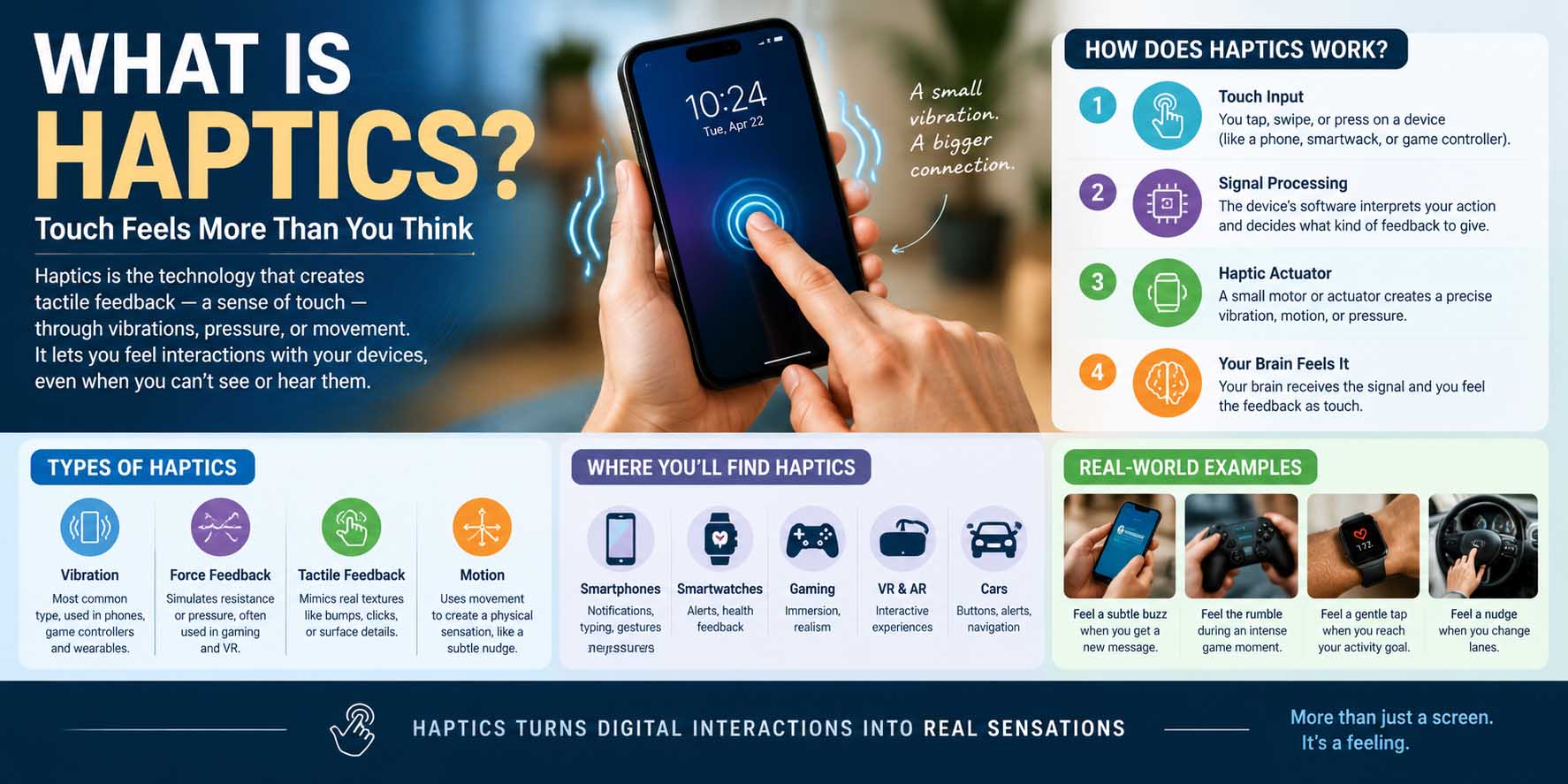
Have you ever felt your phone vibrate when you press a button, receive a notification, or type on a virtual keyboard? That sensation is powered by haptics. If you are wondering what is haptics, it is technology that creates physical sensations, such as vibration, taps, clicks, or resistance, to give you feedback when interacting with a digital device.
Unlike visual or audio feedback, haptic feedback lets technology communicate through your sense of touch. As a result, it can make smartphones, game controllers, cars, wearable devices, medical equipment, and virtual reality systems feel more responsive.
Haptics can be simple, such as a short vibration from a phone, or highly advanced, such as force feedback that makes a virtual object feel like it has weight or resistance. Understanding how it works can help you get more from the devices you already use.
What Is Haptics?
Haptics refers to technology designed to create or simulate a sense of touch. It can reproduce sensations such as vibration, pressure, movement, texture, resistance, or physical feedback.
The term comes from the Greek word haptikos, which relates to the sense of touch. In fact, Merriam-Webster defines haptic as “relating to or based on the sense of touch.” In modern technology, haptics connects digital actions with physical sensations.
For example, when you tap a button on a touchscreen and feel a brief vibration, the device is using haptic feedback. You cannot physically feel the software button itself, but the vibration gives your brain the impression that something happened.
Haptics can also work in more sophisticated ways. A gaming controller may produce different vibrations depending on whether a character drives over gravel, crashes into a wall, or fires a weapon. Meanwhile, a VR controller can provide resistance or vibrations when interacting with objects in a virtual environment.
Haptic Feedback vs. Vibration
People often use “vibration” and “haptics” as if they mean the same thing. However, haptics is a broader concept.
Basic vibration usually means an object physically moves back and forth. Haptic technology uses controlled physical sensations as part of an interaction.
Therefore, the goal is not simply to make a device vibrate. The goal is to communicate information through touch.
How Does Haptic Technology Work?
Haptic systems generally combine software, control electronics, and physical components that generate movement or force.
A typical interaction follows a simple process:
- You perform an action, such as tapping a screen.
- Software detects the interaction.
- A control system determines what feedback to produce.
- An actuator converts the electrical signal into physical movement.
- Your skin detects the resulting sensation.
The process happens extremely quickly, often fast enough to feel like the feedback occurs at the exact moment of your action.
The Role of Actuators
An actuator is one of the key components in a haptic system. It converts electrical energy into physical movement.
Common examples include vibration motors and specialized linear actuators. Different actuator designs can produce different sensations, including short taps, longer vibrations, pulses, and more precise movements.
This is where understanding what is a transducer can also help, because transducers convert energy from one form into another and are widely used in systems that interact with physical signals.
Software Controls the Sensation
Hardware alone does not determine what you feel. Software controls the timing, intensity, duration, and pattern of haptic feedback.
For instance, a phone might use one short pulse for a successful tap and a different pattern for an incoming alert. A game controller can produce more complex effects based on events happening inside a game.
Because of this software control, the same hardware can potentially create many different touch experiences.
What Is Haptics on iPhone?
If you have searched for what is haptics on iPhone, you are probably noticing the small vibrations that happen when you interact with your device.
Apple uses haptic feedback in various parts of the iPhone experience. Depending on the feature and model, you may feel feedback when changing settings, interacting with controls, typing, using system functions, or performing certain gestures.
Apple’s Taptic Engine is designed to provide controlled tactile feedback rather than simply producing a generic vibration.
The result is a more precise sensation. A short tap can feel different from a longer pulse, helping users understand what happened without constantly looking at the screen.
What Is Haptics on an iPhone Used For?
If you are asking what is haptics on an iPhone in practical terms, think of it as touch-based confirmation.
For example, haptic feedback can help you recognize that an action was registered. It can also make certain controls feel more physical even though the screen itself is flat.
Haptics can be especially useful when you are not looking directly at the display. A small tactile response can confirm an interaction without requiring an additional visual cue.
What Is Haptics on My iPhone?
The question what is haptics on my iPhone often comes up when someone notices unexpected vibrations or wants to change the way their phone responds.
Depending on the iOS feature involved, haptic effects can be controlled through different settings. Some settings affect keyboard feedback, system interactions, alerts, or other forms of tactile response.
If haptics feel distracting, checking your iPhone’s relevant sound and haptic settings can help you adjust the experience. Keep in mind that changing one haptic setting does not necessarily disable every type of tactile feedback.
Types of Haptic Feedback
Haptic technology can create several kinds of sensations. The exact experience depends on the hardware, software, and intended application.
Vibrotactile Feedback
Vibrotactile feedback uses vibrations to communicate information through the skin.
It is probably the most familiar type of haptics. Smartphones, smartwatches, game controllers, and other consumer devices commonly use it.
The sensation can vary by frequency, intensity, duration, and pattern. A quick pulse may mean one thing, while a longer sequence can communicate something else.
Force Feedback
Force feedback goes beyond simple vibration by applying physical resistance or force.
A steering wheel used for racing games is a common example. The wheel can become harder to turn or pull in a particular direction based on what happens in the game.
This type of feedback can make virtual interactions feel much more physical.
Electrotactile and Other Advanced Systems
Some research and specialized systems use electrical stimulation or other techniques to create sensations on the skin.
These approaches can support applications where traditional vibration is not enough. However, they are less common in everyday consumer electronics.
What Is Haptics in Robotics?
If you are searching what is haptics in robotics, the idea is closely connected to touch sensing and physical interaction.
Robots traditionally rely on cameras, microphones, proximity sensors, and other systems to understand their surroundings. Haptic technology can give robots another source of information: physical contact.
A robotic system may use tactile sensors to detect pressure, force, vibration, or contact with an object.
For example, a robotic gripper could determine whether it is holding an object too tightly or too loosely. That information can help the robot adjust its grip.
Haptics is particularly useful in situations where vision alone cannot provide enough information.
Haptics and Robotic Control
Haptic systems can also work in the opposite direction by allowing a human operator to feel what a robot is experiencing.
A remote operator could control a robotic arm while receiving force feedback through a specialized interface. This approach can make remote manipulation more intuitive.
For readers interested in the broader field, learning about the applications of robotics provides useful context for understanding where tactile interaction fits into modern robotic systems.
Where Is Haptics Used?
Haptics is now found in many areas of technology.
Smartphones and Wearables
Phones and smartwatches use haptics for notifications, controls, typing, navigation, and other interactions.
Because the devices are small, precise tactile feedback can provide useful information without adding extra visual elements.
Gaming
Gaming is one of the most recognizable applications of haptics.
Controllers can reproduce impacts, movement, environmental effects, and other events through carefully controlled feedback. Racing wheels can also provide resistance and directional forces.
This makes games feel more interactive because the player receives information through both sight and touch.
Virtual and Augmented Reality
VR and AR systems can use haptics to make virtual interactions more convincing.
A controller might vibrate when your virtual hand touches an object. More advanced systems can attempt to simulate pressure, texture, or resistance.
Although current consumer systems have limitations, haptic technology remains an active area of development for immersive computing.
Automotive Technology
Modern vehicles increasingly use tactile feedback in controls and interfaces.
A steering wheel, seat, touchscreen, or physical control can provide a vibration or pulse to confirm an action. This can reduce the need for drivers to look away from the road.
Healthcare and Medical Training
Haptics can also support medical training and specialized equipment.
Simulation systems can provide force feedback to help trainees practice procedures in a controlled environment. In some cases, haptic interfaces can assist with remote or robotic procedures.
Advantages and Limitations of Haptics
Haptics offers several practical benefits, but it is not perfect for every situation.
| Advantage | Why it helps |
|---|---|
| Immediate feedback | Confirms an interaction quickly |
| Better accessibility | Adds another way to receive information |
| More immersive experiences | Makes games and VR feel more physical |
| Reduced visual dependence | Provides feedback without requiring users to look |
| Precise interaction | Different patterns can communicate different events |
There are also limitations.
Haptic effects can become annoying when they are too strong or happen too frequently. Hardware also requires power, space, and careful engineering.
In addition, not every haptic sensation feels natural. A simple vibration may communicate that something happened, but it cannot necessarily reproduce the detailed feel of a real object.
Haptics vs. Other Types of Feedback
Digital devices commonly communicate through three main channels: visual, audio, and tactile feedback.
Visual feedback uses screens, lights, icons, and animations. Audio feedback uses sounds, tones, or spoken information. Haptic feedback communicates through physical sensations.
These methods can work independently, but combining them can create a stronger user experience.
For example, when you receive a notification, your phone might display an icon, play a sound, and provide a vibration. You can then recognize the event through multiple senses.
How to Troubleshoot Haptic Feedback
When haptics stop working, the problem may come from software settings, device configuration, or hardware.
Try these basic steps:
- Check whether haptic feedback is enabled in the relevant settings.
- Increase or adjust the appropriate feedback setting if available.
- Restart the device.
- Install available system updates.
- Test another feature that normally uses haptics.
- Check whether a case or physical issue is interfering with the device.
- If feedback remains absent, consider professional hardware support.
Before assuming the actuator has failed, check the software settings first. Many haptic problems are configuration-related.
Haptics and Smart Devices
Connected devices can use touch feedback alongside sensors and automation.
For example, a smart device may detect an interaction and respond with a vibration. This can make controls easier to use without requiring a screen.
Haptics can therefore complement technologies such as smart home sensors, especially when a device needs to communicate an event locally through touch.
As connected technology becomes more interactive, tactile feedback can provide a simple way to confirm commands and alerts.
Why Haptics Matters for Everyday Technology
Haptics may seem like a small feature, but it plays a major role in how people interact with modern electronics.
A screen can show that you pressed a button. A sound can tell you that an action was registered. Haptics adds another layer by giving you a physical response.
That extra layer can make interfaces feel faster, clearer, and more natural.
The technology also has potential beyond entertainment. Robotics, accessibility, automotive interfaces, medical simulation, and immersive computing can all benefit from better tactile interaction.
Quick Takeaway
So, what is haptics? It is technology that uses controlled physical sensations to communicate information or simulate touch.
From the subtle tap you feel on a smartphone to the force feedback of a gaming controller, haptics connects digital commands with physical sensations. As hardware and software improve, tactile feedback will likely become an even more useful part of how humans interact with machines.
For everyday users, the biggest benefit is simple: technology can communicate with you not only through what you see and hear, but also through what you feel.