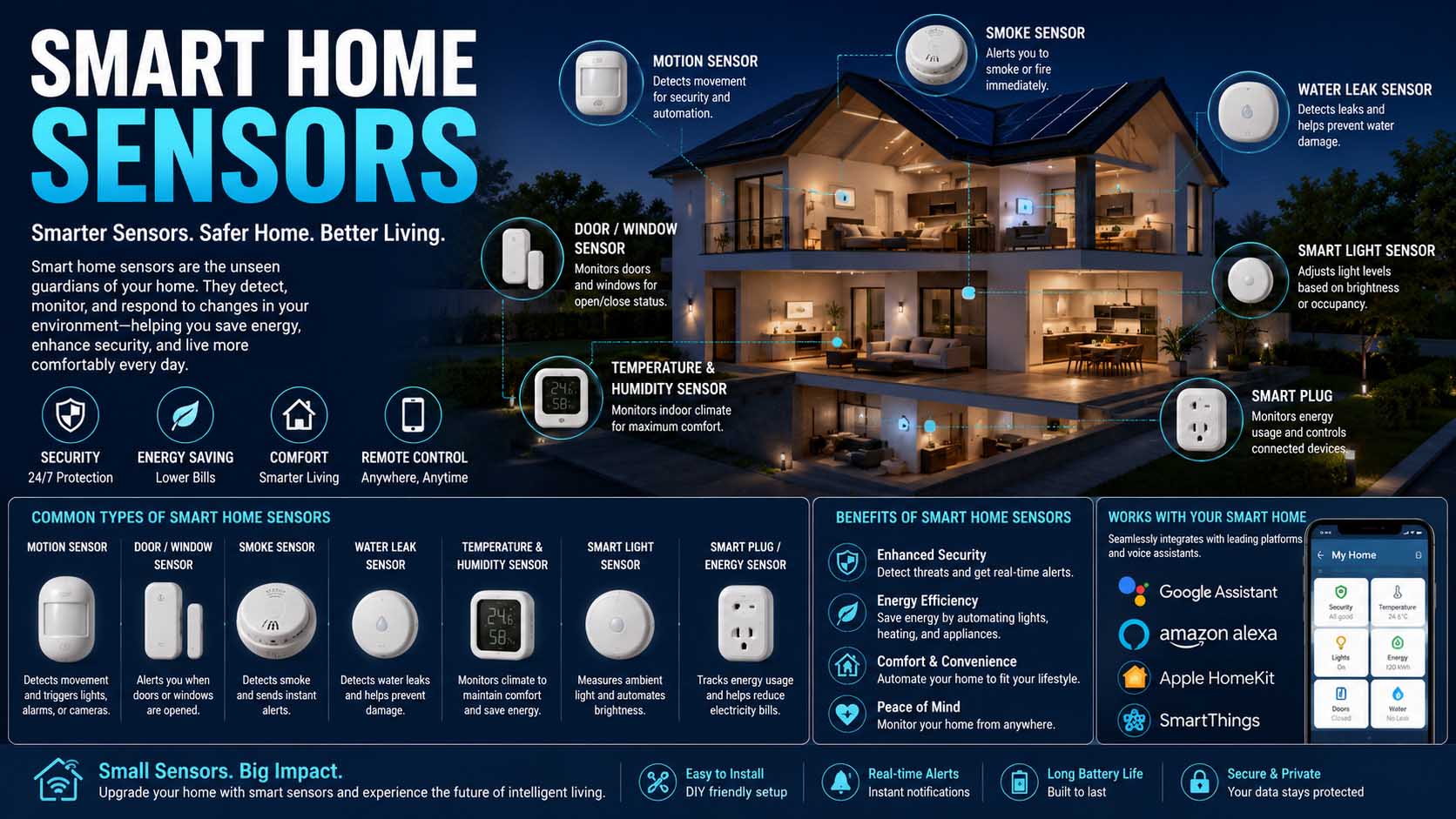
A smart home becomes much more useful when it can detect what is happening instead of waiting for you to press a button. Smart home sensors provide that awareness by detecting movement, temperature, open doors, water leaks, light levels, smoke, occupancy, and other conditions. They can then send information to an app or trigger an automation, such as turning on a hallway light when motion is detected at night.
Sensors range from simple battery-powered contact devices to sophisticated multi-sensors that monitor several conditions at once. However, choosing the right ones depends on your goals, existing smart-home platform, wireless network, and where you plan to install them.
What Are Smart Home Sensors?
Smart home sensors are connected electronic devices that detect physical or environmental changes around a house. Instead of simply displaying a measurement, many can communicate with a smart-home hub, controller, phone app, or another connected device.
For example, a contact sensor can detect that a front door has opened. Meanwhile, a motion sensor can detect movement in a hallway. A water sensor can alert you when moisture appears beneath a washing machine.
The sensing component converts a real-world condition into an electrical signal. Therefore, readers learning what is a transducer will notice an important connection: many sensors rely on transducer principles to convert temperature, pressure, motion, light, or another physical quantity into usable electrical information.
However, sensing is only the first step. The system must then process the information and decide what should happen next.
How Do Smart Home Sensors Work?
A basic smart-home automation usually involves three stages: detection, communication, and action.
First, the sensor detects a change. Next, it sends that information through a wireless or wired connection. Finally, the smart-home platform applies a rule or automation.
Consider a motion sensor installed near a staircase. When it detects movement after sunset, it can send an event to the home automation system. The system can then command compatible lights to turn on.
This setup resembles ideas found in open loop vs closed loop control. A simple automation may issue an action based on one input, while more advanced systems can use additional sensor feedback to decide whether conditions have changed as expected.
Modern sensors commonly communicate through Wi-Fi, Bluetooth, Zigbee, Z-Wave, Thread, or proprietary wireless protocols. Matter has also made cross-platform compatibility an increasingly relevant consideration, although support still varies by device type and ecosystem. In fact, the Connectivity Standards Alliance, which maintains Matter, describes it as one protocol to connect compatible devices and systems with one another.
Common Types of Smart Home Sensors
Not every household needs every sensor. Therefore, it helps to understand what each type actually contributes.
Motion and occupancy sensors
Motion sensors detect movement within an area. Many use passive infrared technology to detect changes in infrared energy associated with people or animals.
They’re useful for lighting, security notifications, and room-based automations.
Occupancy sensors can go further. Depending on the technology, some are designed to detect subtle human presence even when someone is sitting relatively still. As a result, they can be more suitable for offices, bedrooms, or living spaces where traditional motion detection may incorrectly decide that a room is empty.
Door and window contact sensors
Contact sensors usually consist of two pieces. One attaches to the door or window, while the other attaches to the frame.
When the pieces separate, the system recognizes that the opening has changed state.
These inexpensive sensors can support security alerts, lighting automations, heating and cooling routines, or simple reminders. For example, you could receive an alert if a patio door remains open while the air conditioner is running.
Temperature and humidity sensors
Temperature sensors can help automate fans, heaters, thermostats, or climate notifications. Meanwhile, humidity measurements can be useful in bathrooms, basements, greenhouses, and other moisture-sensitive areas.
For instance, an automation might switch on a bathroom exhaust fan when humidity rises above a chosen level.
Water-leak sensors
Water sensors are designed for places where an unnoticed leak could cause expensive damage.
Common locations include beneath sinks, near washing machines, next to water heaters, around dishwashers, and in basements.
Some systems only send an alert. However, more advanced setups can work with a compatible smart shutoff valve to stop the water supply automatically.
Light sensors
Ambient-light sensors measure surrounding brightness. Therefore, they can prevent lights from turning on unnecessarily when a room already receives enough daylight.
They’re particularly useful when combined with motion or occupancy sensing.
Smoke, carbon monoxide, and air-quality sensors
Connected safety devices can send remote notifications as well as sound local alarms. Meanwhile, air-quality sensors may measure particulate matter, volatile organic compounds, carbon dioxide, or other environmental indicators depending on the product.
However, smart features should never replace required certified safety equipment. When buying smoke or carbon monoxide alarms, choose devices that meet the applicable safety standards for your location.
Where Should Smart Home Sensors Be Installed?
Placement has a major effect on performance.
Motion sensors generally work best where they can observe normal movement across their detection area. Meanwhile, contact sensors require accurate alignment between their components.
If you’re working with an entry system, understanding how to align garage door sensors can also be useful because garage safety sensors require correct positioning and a clear path to operate properly. However, those safety sensors serve a different purpose from general smart-home motion sensors.
Water sensors should sit at likely leak points rather than simply somewhere in the same room. For example, placing one directly beside a washing machine connection is more useful than putting it several feet away.
Likewise, avoid installing temperature sensors immediately beside heating vents, sunny windows, radiators, or appliances that produce heat unless you specifically want to measure that location.
Smart Home Sensor Comparison
| Sensor type | Detects | Common use | Typical placement |
|---|---|---|---|
| Motion | Movement | Lighting, security | Hallways, entrances |
| Contact | Open/closed state | Doors and windows | Frames and entry points |
| Temperature | Heat level | Climate automation | Living areas, bedrooms |
| Humidity | Moisture in air | Fans, climate monitoring | Bathrooms, basements |
| Water leak | Presence of water | Leak alerts | Sinks, washers, water heaters |
| Light | Ambient brightness | Lighting automation | Living rooms, hallways |
| Occupancy | Human presence | Room automation | Offices, bedrooms |
| Air quality | Selected pollutants | Environmental monitoring | Living areas, bedrooms |
A multi-sensor can combine several of these functions. Although that reduces the number of individual devices, it may cost more and can limit your placement options.
Smart Home Sensors for Alexa
People searching for the best smart home sensors for Alexa should focus first on compatibility rather than buying based on the sensor specification alone.
A device may work perfectly as a sensor yet offer limited Alexa automation capabilities. Therefore, check exactly which sensor states Alexa can use in routines.
For example, some compatible motion sensors can trigger an Alexa routine when movement occurs. That could turn on a smart light, start another compatible device, or initiate another supported action.
Hub requirements also matter. Some sensors communicate directly through Wi-Fi, whereas Zigbee, Thread, or other products may depend on a compatible hub, border router, bridge, or controller.
Before buying, check the current compatibility information for both the sensor and the Alexa hardware you own.
Smart Home Sensors for HomeKit and Apple Home
Shoppers looking for smart home sensors for HomeKit should check whether a product supports Apple Home directly or through Matter.
Apple’s smart-home ecosystem can use compatible motion, contact, temperature, humidity, and other sensors in automations. For instance, opening a door could activate an entry light, while temperature readings could influence another compatible device.
However, compatibility labels require attention. A product supporting Matter is not automatically guaranteed to expose every feature through every platform.
Also consider whether the setup requires a hub, bridge, or compatible Apple home hub for the features you want, especially remote access and automations.
Connecting Sensors to Other Smart Devices
A sensor becomes more valuable when it can trigger something useful.
For example, a contact sensor could activate a light when a closet opens. Likewise, a motion detector could operate a smart switch after dark.
Home automation often combines sensors with types of switches, including smart wall switches, relays, plugs, and electronically controlled switching devices.
Relays are especially common behind the scenes because they let low-power control signals operate another electrical circuit. If you want to understand that relationship better, how does a relay work explains why relays appear in many automation and control applications.
However, mains-voltage electrical work requires appropriate knowledge and compliance with local electrical rules. When wiring is involved, a qualified electrician may be the safest option.
Choosing the Right Wireless Protocol
Wireless technology affects reliability, battery life, range, and compatibility.
Wi-Fi sensors can connect directly to a home network, which makes setup convenient. However, battery-powered Wi-Fi devices may consume more energy than some low-power alternatives.
Zigbee and Z-Wave have long been popular for home automation because they support low-power devices and mesh networking. However, they typically require a compatible hub or controller.
Thread is another low-power mesh networking technology. Meanwhile, Matter provides an application-layer interoperability standard designed to improve communication across major smart-home ecosystems. Matter devices can operate over technologies such as Thread, Wi-Fi, and Ethernet depending on the device.
Bluetooth can also appear in smart-home products, although its role varies between initial setup, direct control, and networked operation.
Instead of choosing a sensor only because it advertises a particular protocol, consider your existing ecosystem first.
Privacy and Security Matter Too
Smart sensors collect information about what happens inside a home. Although a temperature reading may seem harmless, motion and occupancy patterns can reveal when people are present.
Therefore, review the manufacturer’s privacy and security practices before connecting devices to your network.
Use strong, unique account passwords and enable multi-factor authentication when the platform provides it. Likewise, install firmware updates because manufacturers may use them to fix security vulnerabilities or reliability problems.
Also consider whether automations continue working locally if internet access fails. Some systems process many routines within the home, while others rely more heavily on cloud services.
Local control can improve responsiveness and reduce dependence on an internet connection, although the exact behavior varies by ecosystem.
Common Smart Sensor Problems and Fixes
Even well-designed sensors occasionally stop behaving as expected.
If a sensor appears offline, start by checking its battery. Next, verify its connection to the hub or network.
For unreliable motion detection, review placement and sensitivity settings. Furniture, walls, heat sources, pets, and detection angle can affect performance depending on sensor technology.
If a contact sensor repeatedly reports the wrong state, inspect its alignment. Even a small shift in a door or window can increase the gap between the sensor and magnet.
Wireless problems may also appear when a sensor sits far from its hub or behind materials that weaken radio signals. In that case, repositioning network equipment or adding compatible mesh devices may improve coverage.
Avoid resetting the device immediately unless necessary. A factory reset can remove existing settings and automations, so simpler troubleshooting steps are usually worth trying first.
What Is Happening in the Home Smart Sensors Market?
The home smart sensors market continues moving toward broader interoperability, lower-power wireless communication, and more sophisticated presence detection.
One notable direction is the growth of multi-platform products. Instead of requiring homeowners to remain entirely within one brand’s ecosystem, newer standards aim to make compatible devices easier to use across different platforms.
Presence sensing is also becoming more advanced. Some products can detect subtle occupancy rather than relying only on conventional motion.
Meanwhile, smart home sensors news increasingly focuses on Matter support, Thread connectivity, local processing, energy management, and privacy. Still, buyers should judge products by current capabilities rather than promises about features that may arrive later.
Do You Need a Smart Home Hub?
Not always.
Some Wi-Fi sensors communicate directly with an app or cloud service. In contrast, Zigbee, Z-Wave, Thread, and proprietary products may require additional hardware depending on the system.
A hub can still be valuable because it centralizes devices and may support faster or more reliable local automation.
For a small setup with two or three sensors, direct connectivity may be simpler. However, homeowners planning dozens of devices should think about network structure before buying everything individually.
Choosing an ecosystem early can prevent a collection of incompatible apps, bridges, and accounts later.
Are Smart Home Sensors Worth Buying?
Smart home sensors make the most sense when they solve a specific problem.
A water-leak sensor beside a water heater can provide an early warning. A contact sensor can tell you whether a door was left open. Meanwhile, an occupancy sensor can automate lights without requiring someone to reach for a phone.
Therefore, start with the areas where sensing provides an obvious benefit rather than installing devices everywhere simply because they are available.
Check platform compatibility, battery requirements, wireless range, privacy policies, hub requirements, and automation options before purchasing. Then place each sensor where it can reliably measure the condition that matters.
With a carefully planned setup, smart home sensors can turn isolated connected gadgets into a home that responds automatically to real-world conditions.