The terms verification vs validation are commonly used in software development, engineering, manufacturing, cybersecurity, and quality assurance. Although they sound similar, they serve different purposes throughout a product or system’s lifecycle.
Understanding the distinction helps teams build higher-quality products, reduce costly errors, and ensure customer requirements are met. This guide explains verification and validation in simple terms, compares the two processes, and provides real-world examples for beginners.
What Is Verification?
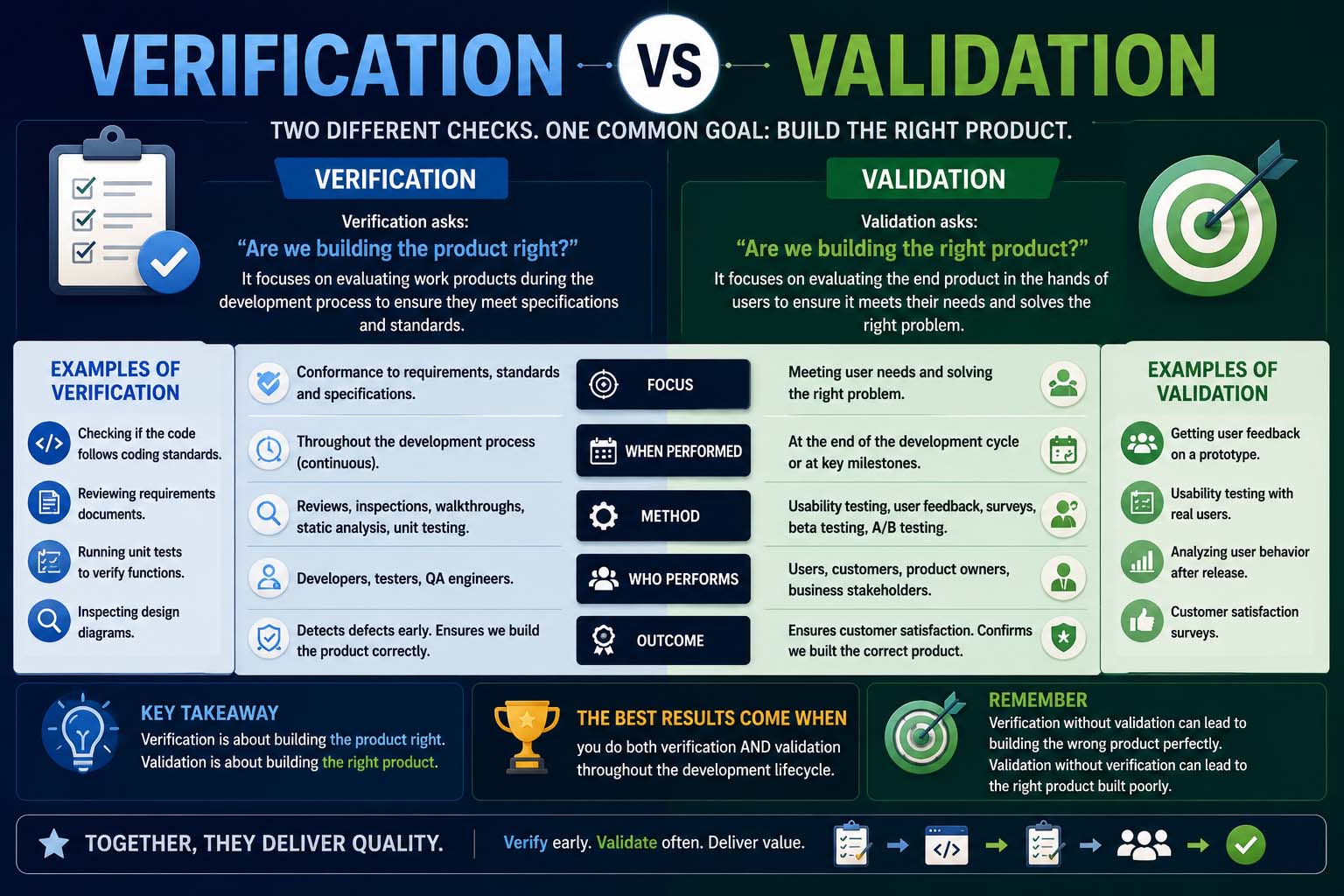
Verification is the process of checking whether a product, system, or document has been built according to its specifications and design requirements.
In simple terms, verification answers the question:
“Are we building the product correctly?”
Verification focuses on ensuring every stage of development follows the approved design and technical documentation.
Common verification activities include:
- Code reviews
- Design reviews
- Document inspections
- Static analysis
- Unit testing
- Requirement reviews
Verification usually occurs throughout the development process before the final product reaches users.
During software maintenance, understanding Reverse Engineering Meaning can also help teams analyze existing systems before beginning verification and redesign work.
What Is Validation?
Validation determines whether the finished product actually satisfies user needs and intended use.
It answers the question:
“Are we building the right product?”
Validation focuses on the customer’s perspective rather than internal technical requirements.
Typical validation activities include:
- User acceptance testing (UAT)
- Beta testing
- Prototype evaluations
- Customer feedback
- Field testing
Validation ensures the completed solution solves the real-world problem it was designed to address.
Teams often review Performance Analytics after deployment to confirm that real users are achieving the expected results and that the product continues to meet business goals.
Verification vs Validation: Quick Comparison
| Verification | Validation |
|---|---|
| Checks specifications | Checks user needs |
| Done during development | Done after development stages |
| Prevents design errors | Confirms usability |
| Mostly internal process | Often involves end users |
| Answers “Are we building it correctly?” | Answers “Are we building the right product?” |
Both processes complement each other and are essential for quality assurance.
Validation vs Verification
Although people often search for validation vs verification, the meaning remains the same regardless of word order.
The key difference is:
Verification
Focuses on:
- Technical accuracy
- Design compliance
- Documentation
- Development standards
Validation
Focuses on:
- Customer satisfaction
- Product usefulness
- Business requirements
- Real-world performance
Successful projects require both verification and validation.
Verification vs Validation Testing
One of the most common applications is verification vs validation testing in software engineering.
Verification Testing
Verification testing includes activities such as:
- Code inspection
- Static testing
- Architecture review
- Requirement validation
- Peer review
These processes identify defects before execution.
Validation Testing
Validation testing evaluates the completed software through execution.
Examples include:
- Functional testing
- System testing
- User acceptance testing
- Beta testing
- Operational testing
These tests confirm the software performs as intended for end users.
Identity Validation vs Verification
Another important comparison is identity validation vs verification, especially in cybersecurity and online services.
Identity Verification
Verification confirms that a person’s claimed identity matches official documentation.
Examples include:
- Passport verification
- Driver’s license verification
- Facial recognition
- Government ID checks
Identity Validation
Validation determines whether the provided identity information is accurate, current, and acceptable for a specific purpose.
This may involve:
- Address confirmation
- Database checks
- Account ownership confirmation
- Compliance verification
Many financial institutions perform both processes before approving new accounts.
Design Verification vs Validation
Engineering teams often discuss design verification vs validation.
Design Verification
Verification ensures the product design meets technical specifications.
Examples:
- Blueprint review
- Engineering calculations
- Material inspections
- Prototype measurements
Design Validation
Validation confirms the design satisfies customer expectations.
Examples:
- User testing
- Product trials
- Field performance
- Customer feedback sessions
This distinction is common in medical devices, automotive manufacturing, and aerospace engineering.
The same verification and validation principles are widely used in What Is Mechatronics, where mechanical, electronic, and software systems must work together reliably.
Step-by-Step: Verification and Validation Process
A structured workflow helps maintain product quality.
Step 1: Define Requirements
Document technical specifications and customer expectations.
Step 2: Develop the Product
Design and build according to approved requirements.
Step 3: Perform Verification
Review documentation, inspect code, and verify compliance.
Step 4: Conduct Validation
Test the finished product with realistic user scenarios.
Step 5: Resolve Issues
Correct identified problems before release.
Step 6: Final Approval
Approve the product for production or public release.
Real-World Examples
Understanding examples makes the concepts easier to remember.
Example 1: Software Application
Verification:
Developers review source code.
Validation:
Users test whether the app solves their problem.
Example 2: Automobile Manufacturing
Verification:
Engineers confirm parts match specifications.
Validation:
Drivers evaluate performance on real roads.
Engineers may also compare Analog vs Digital systems when validating sensors, control units, and electronic components used in modern vehicles.
Example 3: Website Development
Verification:
Developers check page functionality.
Validation:
Customers confirm the website is easy to use.
Common Mistakes
Organizations sometimes misunderstand these concepts.
Skipping Verification
This may result in coding errors, design flaws, or documentation problems.
Ignoring Validation
Products may technically work but fail to satisfy customer needs.
Confusing the Two
Verification and validation have different goals and should both be included in quality assurance plans.
Troubleshooting Verification and Validation Problems
If issues appear during testing, consider these solutions.
Review Requirements
Ensure specifications are complete and up to date.
Improve Documentation
Clear documentation reduces misunderstanding between teams.
Involve End Users Earlier
Customer feedback during development often improves validation results.
Automate Testing
Automated testing tools improve consistency and reduce human error.
Engineers developing control systems also study Open Loop vs Closed Loop designs, since each requires different verification and validation approaches during testing.
Repeat Testing
Verification and validation should continue throughout product development rather than occurring only once.
Best Practices
To improve project quality:
- Document requirements clearly.
- Perform verification at every development stage.
- Include users in validation testing.
- Maintain version control.
- Review test results regularly.
- Continuously improve testing processes.
These practices reduce defects and improve customer satisfaction.
FAQ
What is verification?
Verification checks whether a product has been developed according to technical specifications and design requirements.
What is validation?
Validation confirms that the finished product meets customer needs and performs its intended purpose.
What is the difference between verification and validation?
Verification focuses on building the product correctly, while validation ensures the correct product has been built.
What is verification vs validation testing?
Verification testing checks design and development accuracy, while validation testing evaluates the completed product in real-world use.
What is identity validation vs verification?
Identity verification confirms a person’s identity, while identity validation ensures the identity information is accurate and suitable for a particular process.
What is design verification vs validation?
Design verification checks technical compliance, whereas design validation confirms that the final design satisfies user expectations and business goals.
Conclusion
Understanding verification vs validation is essential in software development, engineering, cybersecurity, manufacturing, and many other industries. While verification ensures a product is built according to specifications, validation confirms that it fulfills user needs and business objectives.