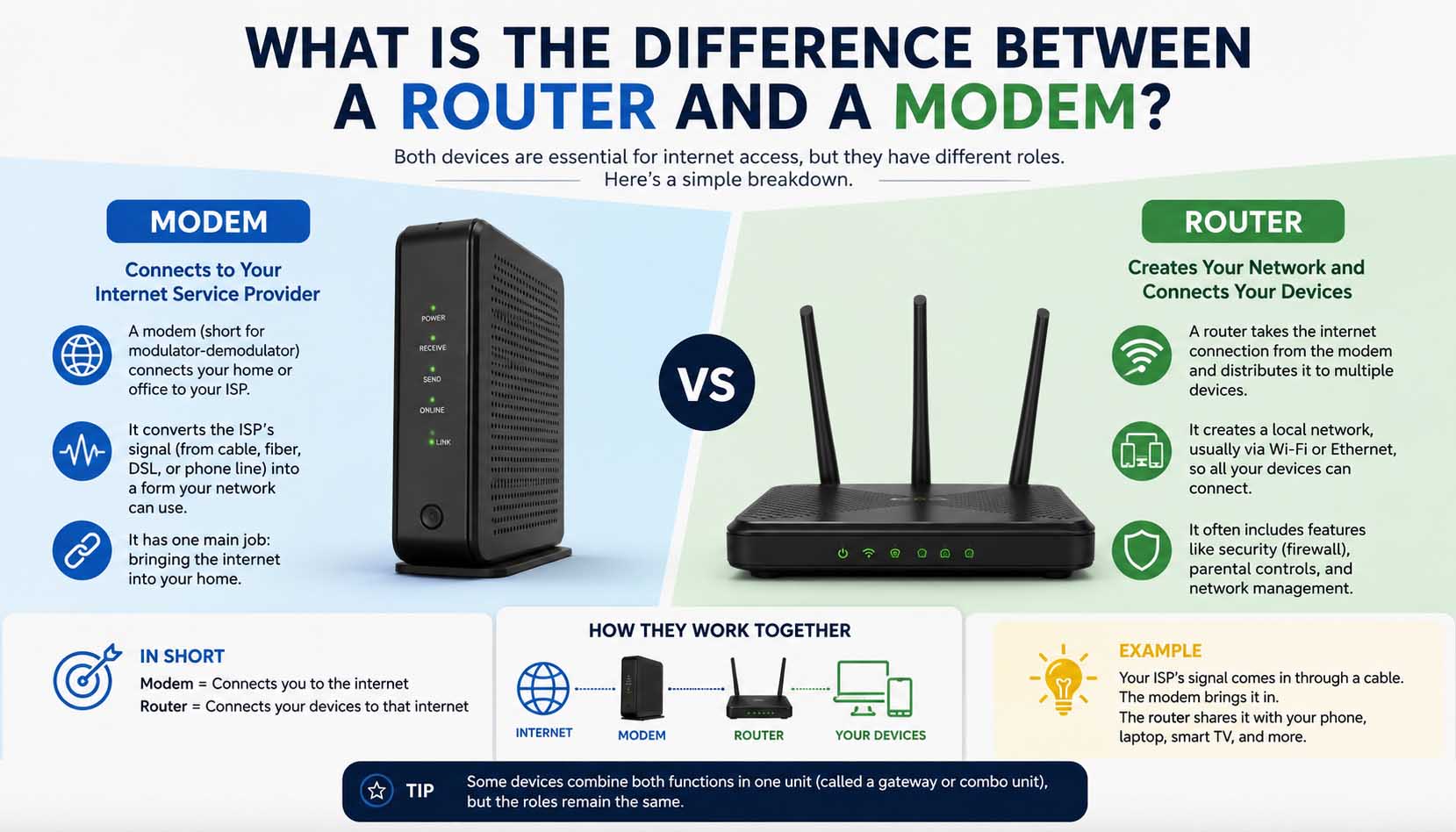
If you have ever set up home internet, you have probably wondered what is the difference between a router and a modem. Although these two boxes often sit side by side, and sometimes come as one unit, they do completely different jobs. In short, a modem connects your home to your internet service provider (ISP), while a router shares that connection with all your wired and wireless devices.
Once you know how each one works, you can fix connection problems faster, pick the right equipment and decide whether you need two devices or an all-in-one combo.
Why the Difference Between a Router and a Modem Matters
Many internet problems become easier to solve when you know which device handles each task.
For example, no internet signal often points to the modem, whereas Wi-Fi problems usually involve the router. Similarly, slow wireless speeds may come from router placement or settings, and ISP outages usually hit the modem first.
As a result, knowing each device’s role can save you time before you call technical support.
What Is a Modem?
A modem is the bridge between your home network and your internet provider. According to Britannica, a modem is a device that converts digital data signals into modulated analog signals and back again.
In practice, it receives internet data from your ISP, turns that signal into data your devices can use and sends data back when you browse, stream or upload files.
Without a modem, your home network has no link to the internet at all.
Also, the type of modem you need depends on your service, such as cable, DSL, fiber or fixed wireless.
If you want to know more about fast broadband, learning how does fiber optic internet work explains how fiber delivers data before it reaches your modem.
What Is a Router?
A router creates your home network.
Once the modem brings the internet in, the router shares that connection with many devices. For instance, it can connect smartphones, laptops, desktop computers, tablets, smart TVs, game consoles, smart home gadgets and security cameras.
In addition, most modern routers provide Wi-Fi, so devices can connect without cables.
Without a router, usually only one wired device could use the internet at a time.
How a Modem Works: Key Difference From a Router
A modem translates signals between your ISP and your home network.
First, your ISP sends internet data to your home. Next, the modem receives the incoming signal and converts it into digital network data. Finally, it passes the connection to your router or straight to a computer.
Although modern modems do this automatically, they remain essential for linking your home to the wider internet.
How a Router Works: Key Difference From a Modem
The router manages traffic inside your home network.
For example, it assigns local IP addresses, manages connected devices and broadcasts Wi-Fi. Moreover, it directs internet traffic, adds network security and lets many devices go online at once.
Instead of talking directly to the ISP, the router talks to the modem.
What Is the Difference Between a Router and a Modem?
The easiest way to understand what is the difference between a modem and a router is to compare their main jobs.
| Feature | Modem | Router |
|---|---|---|
| Connects to ISP | Yes | No |
| Creates Home Network | No | Yes |
| Provides Wi-Fi | Usually No | Yes |
| Connects Multiple Devices | Limited | Yes |
| Assigns Local IP Addresses | No | Yes |
| Required for Internet Access | Yes | Usually Yes |
In other words, the modem connects your home to the internet, while the router connects your devices to the modem.
Difference Between Router and Modem in Simple Terms
Imagine your internet connection as a water system.
The modem acts like the main pipe that brings water into your house. Meanwhile, the router acts like the plumbing that carries water to every tap.
Without the main pipe, there is no water. Likewise, without the inside plumbing, only one spot could get water.
Clearly, the same idea applies to your internet connection.
Can You Use One Without the Other?
Technically, yes.
For example, a modem can connect straight to one computer with an Ethernet cable. On the other hand, a router can create a local network without internet access.
However, most homes use both devices together, because that gives the best experience.
Common Features of Modern Routers
Today, routers do much more than share internet.
For instance, many offer dual-band or tri-band Wi-Fi, guest networks and Quality of Service (QoS). In addition, they often include built-in firewalls, parental controls, device priority settings and mobile app control.
Together, these features improve both performance and security.
Common Features of Modern Modems
Modern modems focus on keeping a steady internet connection.
Depending on your ISP, they may support DOCSIS cable standards, fiber connections, DSL service, gigabit speeds and even landline phone service.
Unlike routers, modems usually have very few settings to change.
Speed: The Difference Between a Router and a Modem
Many people think the router alone decides internet speed.
Actually, the answer is more complex. The modem sets the top speed your ISP connection can deliver, while the router affects how fast that speed reaches each device.
Therefore, if either device is outdated, overall performance can suffer.
For this reason, many people who upgrade to faster broadband also explore the benefits of fiber internet, since high-speed plans work best with modern equipment.
Signs Your Modem May Need Replacement
An old modem can cause connection problems even if your router works fine.
For example, watch for frequent disconnects, speeds below your plan, random reboots, ISP compatibility issues or hardware that is several years old.
In many cases, replacing an outdated modem restores stability without changing the router.
Signs Your Router May Need Replacement
Routers usually wear out more slowly. Still, technology keeps improving over time.
Common warning signs include weak Wi-Fi coverage, slow wireless speeds and dropped connections. Similarly, trouble handling many devices or missing modern Wi-Fi standards are signs to upgrade.
As a result, homes with dozens of smart devices often benefit from a newer router.
Do You Need Both a Router and a Modem?
For most home internet connections, yes.
The modem connects your home to your provider, while the router shares that connection with your devices.
So, if your home has phones, laptops, smart TVs, game consoles, tablets, smart speakers or security cameras, you almost always need a router.
Otherwise, connecting several devices to one internet line would be hard or impossible.
What Is a Modem-Router Combo?
A modem-router combo puts both devices into one box.
Instead of connecting two separate pieces of hardware, everything runs from a single device.
Advantages: It is easier to set up, needs fewer cables, takes less space and usually costs less upfront.
Disadvantages: However, it is harder to upgrade one part, offers less flexibility and may have fewer advanced features.
Overall, a combo works well for small homes and apartments. In contrast, larger homes or heavy users may prefer separate devices.
Separate Devices vs. Combo Units
| Feature | Separate Modem & Router | Modem-Router Combo |
|---|---|---|
| Flexibility | Excellent | Limited |
| Easy Upgrades | Yes | No |
| Initial Cost | Usually higher | Usually lower |
| Performance Options | More choices | Depends on model |
| Setup Simplicity | Moderate | Easy |
There is no single right answer. Ultimately, the better option depends on your budget, internet plan and networking needs.
Router and Modem Problems: Spotting the Difference
When you know which device does which job, troubleshooting gets much easier.
| Problem | Likely Device |
|---|---|
| No internet from ISP | Modem |
| Wi-Fi signal missing | Router |
| Weak wireless coverage | Router |
| Only one device can connect | Router |
| ISP activation issue | Modem |
| Poor Wi-Fi range | Router |
In fact, restarting both devices often fixes short-term problems before you need deeper troubleshooting.
Simple Troubleshooting Steps
If your internet stops working, try these steps before you call your provider.
Check the modem: First, look at the status lights. If the internet or online light is off or blinking oddly, the modem may not be talking to your ISP.
Restart both devices: Next, turn off the modem and router. Wait about 30 seconds, turn the modem back on and, once it reconnects, switch on the router.
Check cable connections: Then, make sure every Ethernet and coaxial cable is firmly attached, since loose cables can cut the connection.
Test a wired connection: After that, plug a computer straight into the router or modem. This way, you can tell whether the problem is Wi-Fi or the internet line itself.
Contact your ISP: Finally, if the modem still cannot connect, the issue may be outside your home.
Security Best Practices
Modern routers include several features that protect your home network.
First, change the default admin password and use WPA3 or WPA2 encryption if available. Next, keep the router firmware updated and turn off remote management you do not use.
In addition, create a guest network for visitors and choose a strong Wi-Fi password.
Together, these simple steps lower the risk of unwanted access.
Common Myths About the Router and Modem Difference
Several myths still confuse new internet users.
Myth 1, the router connects to the internet: In fact, the router only shares the connection. The modem is what talks directly to your provider.
Myth 2, faster Wi-Fi always means faster internet: However, even a powerful router cannot beat the speed of your internet plan, because the modem and ISP set the limit.
Myth 3, every plan includes a router: Actually, some providers supply only a modem, while others offer a combo. In some cases, you must buy your own router.
Buying Tips
If you are shopping for network equipment, keep these points in mind.
Choose a compatible modem: Not every modem works with every ISP, so check compatibility before you buy.
Match the router to your speed: Also, a router with modern Wi-Fi standards helps you avoid slowdowns.
Consider your home size: Similarly, larger homes often benefit from mesh Wi-Fi or stronger routers.
Think about future needs: Finally, if you plan to add more smart devices, pick equipment that can handle extra connections.
Frequently Asked Questions
What is the difference between a router and modem?
A modem connects your home to your internet provider, while a router shares that connection with all your wired and wireless devices.
Can I use Wi-Fi without a router?
Generally, no. Most Wi-Fi networks need a router or a modem-router combo to create the wireless network.
Do I need a modem if I already have a router?
Yes, unless your router has a built-in modem. After all, a standard router cannot talk directly to your ISP.
Is a modem-router combo a good choice?
For many homes, yes. Combo devices make setup simple and reduce clutter. On the other hand, separate devices offer more flexibility and easier upgrades.
How often should I replace my router?
Many routers stay reliable for several years. However, consider upgrading when yours no longer supports your speed, modern Wi-Fi standards or the number of devices in your home.
Understanding Your Home Network
Each device has a clear role: the modem brings the internet into your home, while the router shares it with all your devices. Together, they create the reliable network most homes depend on every day.
As your home network grows, you may also come across ideas such as what is a swap file, which relates to how computers manage memory rather than how network gear handles internet traffic. Indeed, knowing the difference between hardware and software topics makes troubleshooting much less confusing.
When you choose new equipment, focus on compatibility with your internet service, the size of your home and the number of devices you use. In the end, a well-matched modem and router improve reliability, give better wireless coverage and help you get the most from your internet for years.