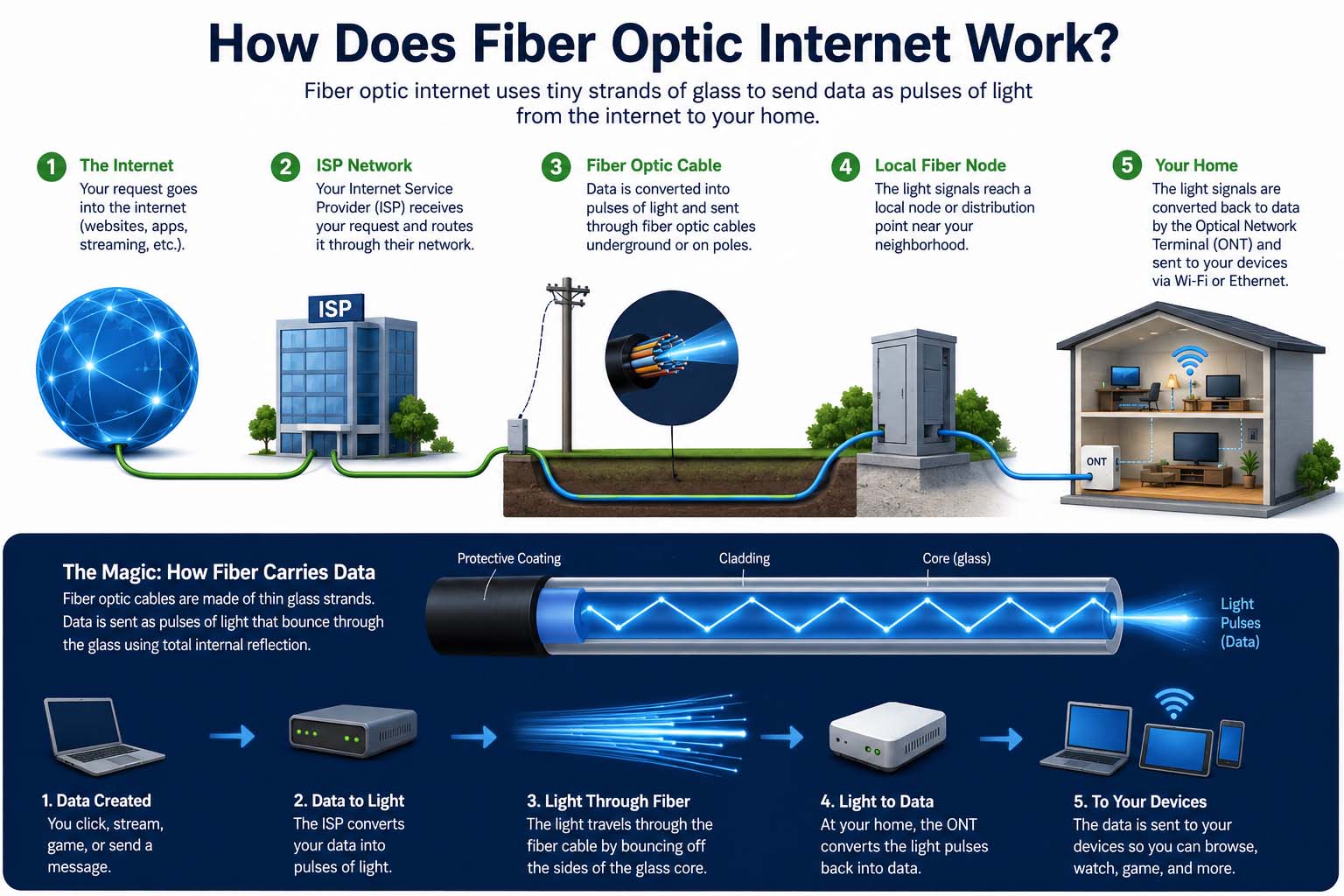
Have you ever wondered how does fiber optic internet work and why it can outperform traditional broadband? Fiber internet sends information through thin strands of glass or plastic using pulses of light. As a result, it can deliver fast downloads, quick uploads, and reliable performance for activities such as video streaming, online gaming, and video calls.
Unlike traditional copper-based connections, fiber uses light to transmit digital information. This technology supports high bandwidth over long distances with relatively little signal loss. However, your actual internet speed still depends on your provider, service plan, home equipment, and network conditions.
In addition, fiber technology supports high bandwidth over long distances with relatively little signal loss. However, your actual internet speed still depends on your provider, service plan, home equipment, and network conditions.
What Is Fiber Optic Internet and How Does It Work?
Fiber optic internet is a broadband connection that uses fiber-optic cables to transmit data through light signals. These cables contain extremely thin strands of glass or plastic designed to guide light from one point to another.
Internet service providers use fiber networks to connect their infrastructure to homes, businesses, and data centers. Depending on the network design, fiber may reach the building directly or connect to a nearby cabinet before another type of cable completes the connection.
For more information about broadband technologies and service classifications, read the Federal Communications Commission’s broadband technology information.
The main components include:
- Fiber-optic cable: Carries light signals containing digital information.
- Optical transmitter: Converts electronic data into light pulses.
- Optical receiver: Converts incoming light signals back into data.
- Optical network terminal (ONT): Connects a fiber service to the customer’s home network.
- Router: Distributes the internet connection to devices over Wi-Fi or Ethernet.
Together, these components allow digital information to travel between your devices and online servers.
How Does Fiber Optic Internet Work Step by Step?
Fiber internet converts digital information into light pulses and transmits them through fiber-optic cables. At the receiving end, specialized equipment converts those signals back into digital data.
First, your device sends a request when you open a website or start a video. Next, your router forwards that request through your home network. Then, optical equipment converts the information into light pulses. Meanwhile, the fiber cable guides those pulses toward the provider’s network and the destination server.
Understanding how does fiber optic internet work helps explain why fiber connections can deliver fast downloads, reliable uploads, and low-latency performance.
Fiber internet works by converting digital information into light pulses and transmitting those pulses through fiber-optic cables. At the receiving end, specialized equipment converts the light signals back into digital data.
Here is how the process typically works:
- Your device sends a request. When you open a website or start a video, your device sends a request through your router.
- The router forwards the data. The request travels through your home network and reaches the fiber connection.
- Optical equipment converts the signal. A transmitter encodes the information into light pulses.
- Light travels through the fiber. The cable guides the pulses toward the provider’s network and the destination server.
- The destination processes the request. The server responds with the requested information.
- The response returns to your device. The network sends the data back through the fiber connection, and your equipment makes it available to your browser or app.
This process happens extremely quickly. Although the signal travels through physical infrastructure, efficient optical transmission helps fiber networks provide low latency and high capacity.
How Does Fiber Optic Internet Transmit Data Using Light?
Fiber-optic cables transmit data using light that remains guided within the cable’s core. The core is surrounded by a layer called cladding, which helps keep the light inside the fiber through a process known as total internal reflection.
The cable also includes protective coatings that help prevent physical damage. These layers matter because a damaged or sharply bent fiber can interfere with signal transmission.
| Component | Function |
|---|---|
| Core | Guides the light signal through the cable |
| Cladding | Helps confine light within the core |
| Protective coating | Shields the fiber from damage |
| Optical transmitter | Converts digital information into light signals |
| Optical receiver | Converts received light into electronic data |
Fiber networks may use different wavelengths of light to carry information. Some systems also use multiple wavelengths on the same fiber to increase capacity.
The technology is different from other forms of energy conversion. For example, understanding how does a thermocouple work helps explain how sensors convert temperature differences into electrical signals, whereas fiber internet transmits information using optical signals.
How Does Fiber Optic Internet Compare With Traditional Broadband?
Fiber internet differs from cable and DSL broadband in how it transports data.
| Feature | Fiber Internet | Cable Internet | DSL Internet |
|---|---|---|---|
| Transmission method | Light through optical fiber | Electrical signals over coaxial cable | Electrical signals over telephone lines |
| Download speed | Often very high | Often high | Usually lower |
| Upload performance | Often comparable to download speed | May be lower than download speed | Usually more limited |
| Distance effects | Low signal loss across long fiber links | Depends on network design and conditions | Performance often declines with line distance |
| Availability | Depends on fiber deployment | Common in many cable-served areas | Depends on telephone infrastructure |
Fiber is often a strong choice for households that upload large files, use cloud applications, or stream on multiple devices. Nevertheless, cable internet can also deliver excellent performance, while a well-priced cable plan may be sufficient for everyday browsing.
To learn about another type of engineered material, explore what is carbon fiber. Carbon fiber is a strong, lightweight material, whereas fiber-optic cable is specifically designed to guide light.
Why Is Fiber Optic Internet So Fast?
Fiber internet can provide high speeds because optical signals support substantial data capacity and experience relatively little signal loss over long distances. In addition, fiber networks can use advanced optical equipment to carry large amounts of information simultaneously.
Several factors contribute to its performance:
- High bandwidth: Fiber can support large volumes of data traffic.
- Fast uploads: Many fiber plans offer upload speeds close to download speeds.
- Low latency: Efficient network infrastructure can reduce delays.
- Long-distance transmission: Fiber can carry signals over considerable distances without the same level of loss associated with many copper connections.
- Network capacity: Providers can upgrade optical equipment to increase capacity without necessarily replacing every fiber cable.
However, the cable itself does not guarantee a particular speed. Your subscription, provider congestion, router quality, Wi-Fi interference, and device limitations can all affect the results.
For instance, a gigabit fiber plan may deliver lower speeds to a phone connected through weak Wi-Fi. Testing with an Ethernet-connected computer can help determine whether the limitation comes from the internet service or the wireless network.
What Are the Main Advantages of Fiber Optic Internet?
Fiber offers several practical benefits for homes and businesses. Its performance makes it particularly useful when many devices need a reliable connection at the same time.
Key advantages include:
- Fast downloads: Large files, games, and software updates can download quickly.
- Strong upload speeds: Video conferencing, cloud backups, and file sharing can work more efficiently.
- Reliable long-distance transmission: Fiber can carry data over long distances with relatively low signal loss.
- Support for multiple users: High-capacity connections can handle several demanding online activities.
- Low electromagnetic interference: Fiber is less susceptible to electromagnetic interference than copper cables.
- Room for future upgrades: Existing fiber infrastructure may support faster services through upgraded network equipment.
These benefits can make fiber a useful option for remote workers, content creators, gamers, and households with many connected devices.
Fiber technology also supports communication and monitoring across different industries. For example, how does a wind turbine work explains how wind energy is converted into electricity, while fiber networks can carry digital information used to monitor and manage equipment.
What Are the Disadvantages of Fiber Optic Internet?
Although fiber offers strong performance, it is not available everywhere. Providers need to install fiber infrastructure, and extending the network to rural or remote locations can be expensive.
Other potential drawbacks include:
- Limited availability: Some neighborhoods do not have fiber coverage.
- Installation costs: Connecting a property may require professional installation or additional work.
- Equipment requirements: Fiber service usually requires an optical network terminal and compatible networking equipment.
- Physical sensitivity: Fiber cables can be damaged by crushing, careless handling, or excessive bending.
- Plan restrictions: Some providers offer limited speed tiers or impose other service conditions.
Availability and installation costs vary by location. Before switching, check whether the provider offers fiber directly to your property, what equipment is included, and whether installation fees apply.
You should also compare upload speeds, data policies, contract terms, and monthly costs rather than choosing a plan based on download speed alone.
How Does Fiber Optic Internet Work in Your Home?
For most residential customers, the fiber connection enters the home and connects to an optical network terminal. The ONT converts optical signals into electrical data that compatible networking equipment can use.
In a typical setup, the connection follows this path:
Provider’s fiber network → Fiber cable → Optical network terminal → Router → Your devices
Some providers combine the ONT and router into a single device. Others install separate units. Your phone, laptop, television, and gaming console then connect through Wi-Fi or Ethernet.
For the best results, place the router in a central, open location. Keep it away from large obstructions and sources of wireless interference. If a device needs stable performance for gaming or video calls, an Ethernet connection may provide better consistency than Wi-Fi.
If your home already has fiber installed, upgrading the router or improving Wi-Fi coverage may be more useful than paying for a faster internet plan.
How Can You Troubleshoot Fiber Optic Internet Problems?
Fiber connections are generally reliable, but equipment problems, damaged cables, and provider outages can still interrupt service. Before contacting technical support, check the following items.
1. Check the cables and connections. Make sure the fiber equipment and router are connected properly. Avoid touching the fiber connector or looking directly into the cable end.
2. Review the equipment lights. Your ONT may use indicator lights to show power, optical signal, and network status. Consult the manufacturer’s guide because light meanings vary by model.
3. Restart the equipment safely. Follow your provider’s recommended restart procedure for the ONT and router. Wait for the connection to restore before testing again.
4. Test with Ethernet. Connect a computer to the router using an Ethernet cable. If performance improves, the issue may involve Wi-Fi coverage rather than the fiber service.
5. Run a speed test. Compare the result with your subscription’s expected performance. Run more than one test and, if possible, test at different times.
6. Check for an outage. If the optical signal indicator shows a fault or several devices lose service at once, contact your provider. Do not attempt to repair fiber infrastructure yourself.
When reporting a fault, share the status lights, test results, and time the problem began. This information can help the provider identify the cause more quickly.
Is Fiber Optic Internet More Secure?
Fiber internet can offer some physical security advantages because optical cables do not radiate electromagnetic signals in the same way as many copper cables. However, that does not make a fiber connection automatically secure.
Online security still depends on how the network is configured and how you use your devices. Use a strong router password, enable modern Wi-Fi security, keep your equipment updated, and protect important accounts with multifactor authentication.
Businesses should also use appropriate access controls, encryption, network monitoring, and backup systems. Fiber provides a high-performance transport medium, but cybersecurity requires protection at several levels.
For organizations managing data systems, understanding ETL process optimization can help improve data pipeline performance. Similarly, the distinction between verification vs validation is useful when checking whether a system meets its requirements and solves the intended problem.
Frequently Asked Questions About Fiber Optic Internet
Does fiber internet use light to transmit data?
Yes. Fiber-optic systems encode digital information into light signals that travel through a glass or plastic fiber. Optical equipment converts the signals back into data at the receiving end.
Is fiber internet faster than cable internet?
Fiber often provides faster upload speeds and can offer higher overall capacity. However, actual performance depends on the specific plans, equipment, and network conditions available in your area.
Does fiber internet work during a power outage?
Not usually without backup power. The fiber cable itself does not require electricity along its entire path, but your ONT, router, and other local equipment need power. A suitable battery backup may keep your home connection running during some outages, depending on the provider’s network.
Can fiber internet improve online gaming?
It can. Fiber plans often provide low latency and strong upload performance, which can help online gaming. Still, server distance, routing, Wi-Fi quality, and network congestion also influence lag.
Do you need a special router for fiber internet?
You need compatible equipment, but not every fiber installation requires a unique router. The provider typically supplies or specifies an ONT, and a compatible router connects to it through Ethernet or integrated equipment.
How can you check whether fiber internet is available?
Use the availability checker on an internet provider’s official website or contact its support team. Confirm that the service reaches your property, since fiber in your neighborhood does not always mean every home can connect immediately.
Final Thoughts on How Fiber Optic Internet Works
Understanding how does fiber optic internet work starts with one basic principle: it transmits digital information as light through specialized cables. As a result, fiber can support high bandwidth, fast uploads, and low latency.
Nevertheless, availability, installation costs, service plans, and home networking equipment all affect the experience. Before choosing a plan, compare coverage, upload and download speeds, equipment requirements, and total costs. By doing so, you can make a more informed decision about whether fiber is right for your home or business.
Fiber can provide high bandwidth, strong upload speeds, and low latency, making it useful for modern homes and businesses. However, availability, installation costs, service plans, and home networking equipment all affect the experience.
Before choosing a plan, compare the provider’s coverage, upload and download speeds, equipment requirements, and total cost. That way, you can decide whether fiber is the right connection for your needs.